Asset Compliance - Compliance History
The Asset Details > Asset Compliance tab > Compliance History sub-tab shows you whether compliance checks were completed within or outside of the compliance timeframes.
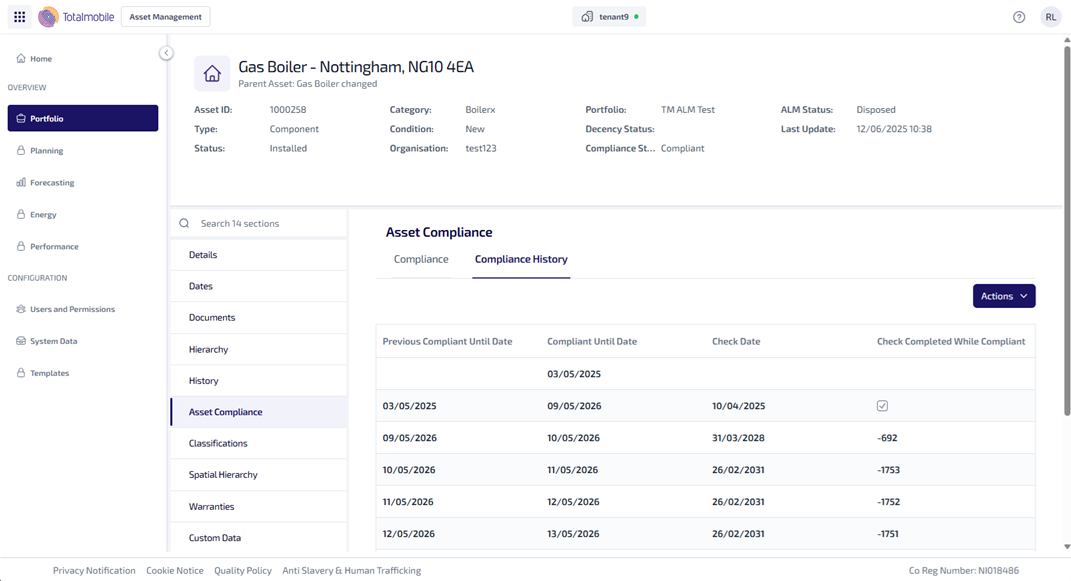
The Compliance History sub-tab shows the following information:
-
Previous Compliant Until Date - the date the asset was previously compliant.
-
Compliant Until Date - the date the asset is compliant until.
-
Check Date - the date the compliance check was carried out.
-
Check Completed While Compliant - this shows whether the compliance check was carried out while the asset was still compliant. It is calculated by comparing the Previous Complaint Unit Date and the Check Date.
-
If the Check Date is before the Previous Complaint Until Date, it means the asset was checked within its compliance timeframe and a tick is shown.
-
If the Check Date is after the Previous Compliant Until Date, it means the asset was checked outside its compliance timeframe and a minus number is shown, which is the number of days outside the timeframe the check was completed.
-
The information shown in Compliance History can be exported.
To Export the Compliance History information:
-
From the Portfolio page, select the asset in the Asset Register.
-
Select View Asset.
-
The Asset Details page is shown, select the Asset Compliance tab.
-
Select the Compliance History sub-tab.
-
Select Actions and then Export from the dropdown menu
-
The information is downloaded as a .csv file and appears in your Downloads folder.