Asset Info - History
The Portfolio > Asset Register tab > select Asset > History tab in Asset Info shows you a history of any changes against the asset made in the Asset Details page, such as the assets status changing from ‘Pending’ to ‘Disposed’.
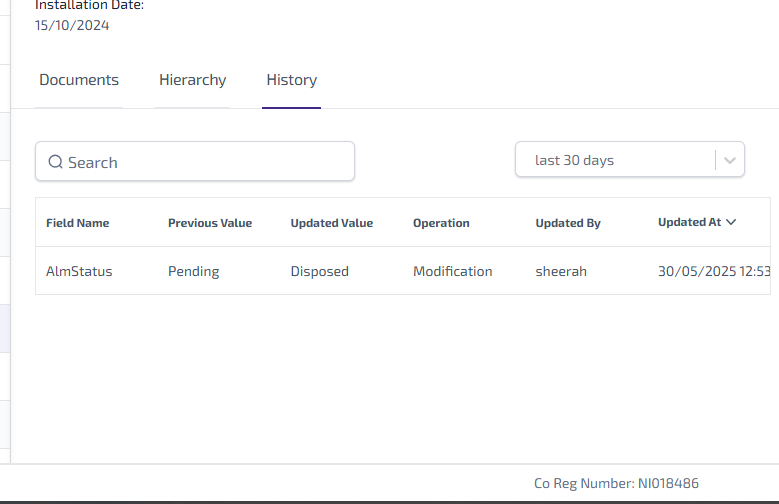
For each historical change you are shown the following information:
-
Field Name - the name of the field changed.
-
Previous Value - the value which was updated on the Asset Details page.
-
Updated Value - the new value entered on the Asset Details page.
-
Operation - the type of change made, which is either going to be Creation, Modification or Deletion.
-
Updated By - the name of the user who made the change.
-
Updated At - the date and time the change was made.
The following options are available:
-
Search* - type the full, or partial, criteria into the Search field and press the Enter key on the keyboard to show all matching results.
-
Duration list - select the duration field to see a dropdown list and select either Last 30 Days, Last 60 Days, or Last 90 Days, to show all matching results.
*The Search field is a ‘begins with’ search, therefore ensure the criteria entered is always the beginning word/s of what you are searching for.