Heating Systems
The Heating System section allows you to detail the main and secondary heating systems, including fuels and controls.
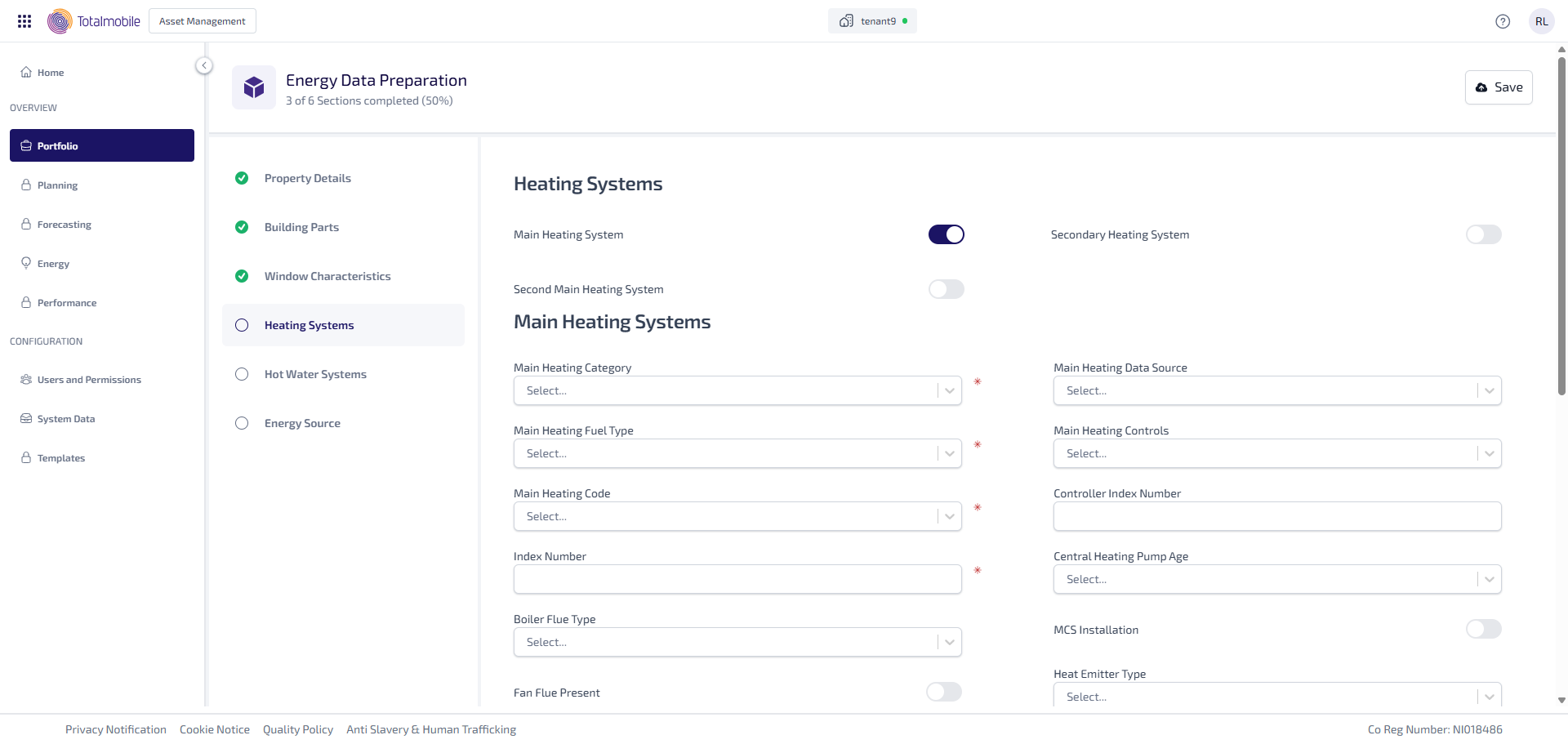
Enter the following information:
-
Select the Main Heating System toggle to state whether there is a main heating system. When active this shows the fields available to add the information needed.
-
Select the Second Main Heating System toggle to state whether there is a second main heating system. When active this shows the fields available to add the information needed.
-
Select the Secondary Heating System toggle to state whether there is a secondary heating system. When active this shows the fields available to add the information needed.
-
Under Main Heating Systems:
-
Select the Main Heating Category* dropdown, then select the main heating category such as, Boilers with Radiators or Underfloor Heating or Electric Storage Heaters.
-
If Boilers with Radiators or Underfloor Heating was selected as the Main Heating Category, the Boiler Type field is shown. Select the Boiler Type* dropdown, then select the type of boiler such as, Standard or Combi.
-
Select the Main Heating Fuel Type* dropdown, then select type of fuel such as, Main Gas or LPG.
-
Select the Main Heating Code* dropdown, then select the heating code such as, Auto Feed Independent Boiler in Heated Space or Open Fire with Back Boiler to Radiators.
-
Enter the Index Number.
-
Select the Boiler Flue Type dropdown, then select either Open Flue or Balanced Flue.
-
Select the Fan Flue Present toggle to state whether a fan flue is present.
-
Select the Main Heating Data Source dropdown, then select either Database or SAP Table.
-
Select the Main Heating Controls dropdown, then select the type of heating control such as, Room Thermostat Only or Programmer and Room Thermostat.
-
Enter the Controller Index Number.
-
Select the Central Heating Pump Age dropdown, then select the heating pump age from either Unknown, 2012 or Earlier, or 2013 or Later.
-
Select the MCS Installation toggle to state whether it is a MCS installation.
-
Select the Heat Emitter Type dropdown, then select how the heat is emitted such as, Radiators or Underfloor.
-
Select the Design Flow Temperature of Heat Generator dropdown, then select the design flow temperature of the heat generator such as, Over 45ºC or Less Than or Equal to 35ºC.
-
-
Under Second Main Heating Systems:
-
Select the Heated Floor Area (%) dropdown, then select percentage of heated floor area in 10’s from 10 to 100.
-
Select the Main Heating Category* dropdown, then select the main heating category such as, Boilers with Radiators or Underfloor Heating or Electric Storage Heaters.
-
If Boilers with Radiators or Underfloor Heating was selected as the Main Heating Category, the Boiler Type field is shown. Select the Boiler Type* dropdown, then select the type of boiler such as, Standard or Combi.
-
Select the Main Heating Fuel Type* dropdown, then select type of fuel such as, Main Gas or LPG.
-
Select the Main Heating Code* dropdown, then select the heating code such as, Auto Feed Independent Boiler in Heated Space or Open Fire with Back Boiler to Radiators.
-
Enter the Index Number*.
-
Select the Boiler Flue Type dropdown, then select either Open Flue or Balanced Flue.
-
Select the Fan Flue Present toggle to state whether a fan flue is present.
-
Select the Main Heating Data Source dropdown, then select either Database or SAP Table.
-
Select the Main Heating Controls dropdown, then select the type of heating control such as, Room Thermostat Only or Programmer and Room Thermostat.
-
Enter the Controller Index Number.
-
Select the Central Heating Pump Age dropdown, then select the heating pump age from either Unknown, 2012 or Earlier, or 2013 or Later.
-
Select the MCS Installation toggle to state whether it is a MCS installation.
-
Select the Heat Emitter Type dropdown, then select how the heat is emitted such as, Radiators or Underfloor.
-
Select the Design Flow Temperature of Heat Generator dropdown, then select the design flow temperature of the heat generator such as, Over 45ºC or Less Than or Equal to 35ºC.
-
-
Under Secondary Heating Systems:
-
Select the Secondary Heating System Fuel Type* dropdown, then select type of fuel such as, Main Gas or LPG.
-
Select the Secondary Heating System Type* dropdown, then select the heating system type such as, Auto Feed Independent Boiler in Heated Space or Open Fire with Back Boiler to Radiators.
-
-
Under Flue Gas Heat Recovery System (FGHRS):
-
Select the Has Flue Gas Heat Recovery toggle to state whether the gas flue has heat recovery. This determines whether the Product Index Number field is enabled or not.
-
Enter the Product Index Number, if the field is enabled.
-
Enter the FGHRS PV Peak Power.
-
Select the FGHRS PV Pitch dropdown, then select the PV pitch for the flue gas heat recovery system such as, Horizontal or 30º.
-
Select the FGHRS PV Overshading dropdown, then select PV overshading for the flue gas heat recovery system such as, Very Little or Modest.
-
*These are required fields.