Hot Water Systems
The Hot Water Systems section allows you to collect information on the water heating systems and their energy performance.
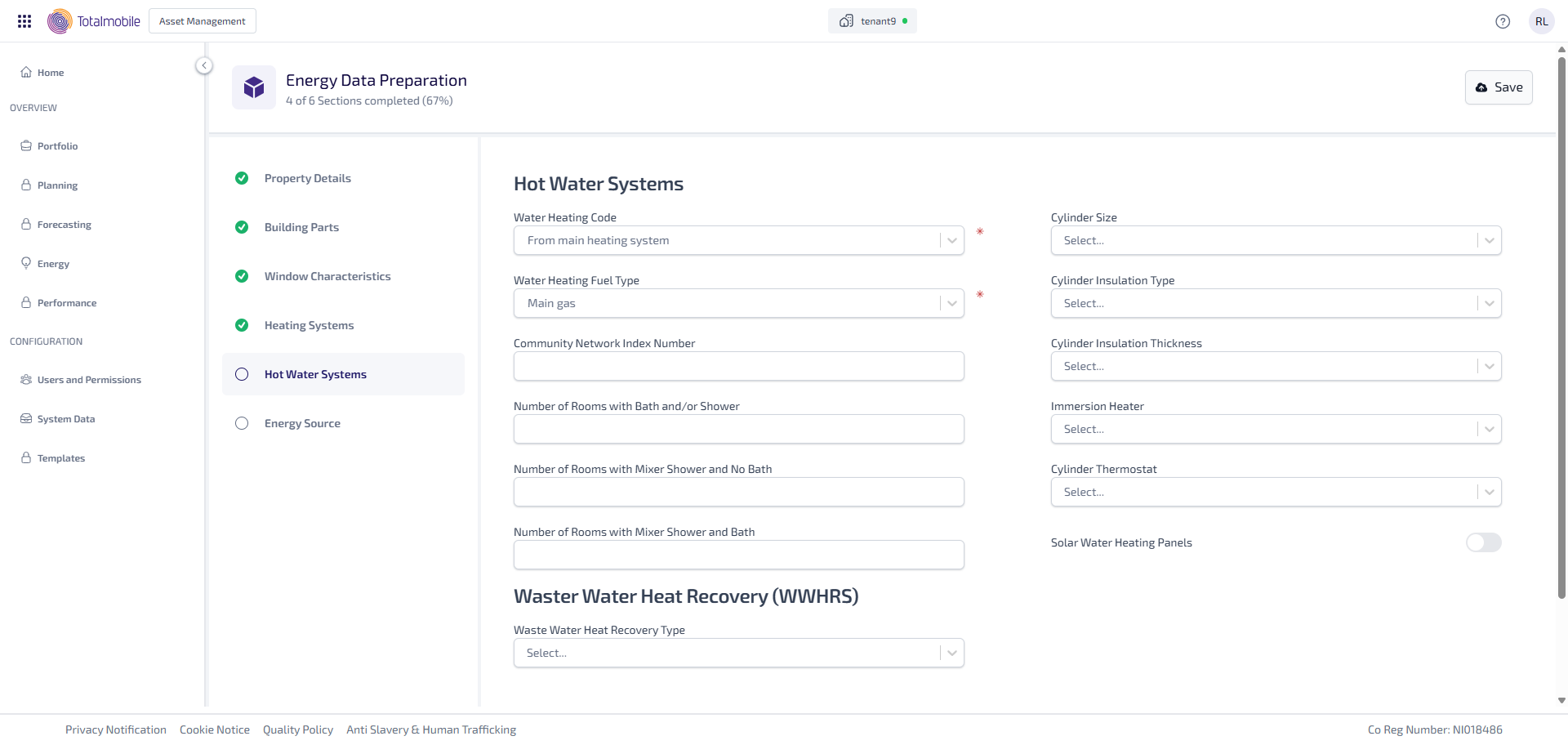
Enter the following information:
-
Select the Water Heating Code* dropdown, then select what is used for heating the water such as, From Main Heating System or Electric Immersion.
-
Select the Water Heating Fuel Type* dropdown, then select the heating type used to heat the water such as, Main Gas or LPG.
-
Enter the Community Network Index Number.
-
Enter the Number of Rooms with Bath and/or Shower.
-
Enter the Number of Rooms with Mixer Shower and No Bath.
-
Enter the Number of Rooms with Mixer Shower and Bath.
-
Select the Cylinder Size dropdown, then select the size of the cylinder such as, No Cylinder or Normal (up to 130 litres).
-
Select the Cylinder Insulation Type dropdown, then select the type of cylinder insulation from either None, Loose Jacket, or Factory-Applied.
-
Select the Cylinder Insulation Thickness dropdown, then select the thickness of the cylinder insulation such as, 0mm (no insulation) or 12mm.
-
Select the Immersion Heater dropdown, then select whether the immersion heater is Single or Dual.
-
Select the Cylinder Thermostat dropdown, then select Yes or No to state whether there is a cylinder thermostat.
-
Select the Solar Water Heating Panels toggle to state whether there are any solar water heating panels. When active this shows the fields available to add the information needed.
-
Under Waster Water Heat Recovery (WWHRS):
-
Select the Waste Water Heat Recovery Type dropdown, then select Instantaneous or Storage to state the recovery type for the waster water. The option selected determines the fields available to add the information needed:
-
Instantaneous selected:
-
Select the Number of Systems dropdown, then select whether there are 1 or 2 waster water heat recovery systems. The number selected determines whether there are 1 or 2 additional Waster Water Heat Recovery (WWHRS) System sections to complete.
-
Under Waster Water Heat Recovery (WWHRS) System 1 and/or 2:
-
Enter the Product Index Number.
-
Enter the Number of Mixer Showers in Rooms With Bath.
-
Enter the Number of Mixer Showers in Rooms Without Bath.
-
-
-
Storage selected:
-
Enter the Product Index Number.
-
Enter the Total Showers and Bath.
-
Enter the Number of Showers and Bath Routed Through WWHRS.
-
-
-
Under Solar Water Heating Panels:
-
Select the Solar Panels Pitch dropdown, then select a pitch such as, Horizontal or 30º. Selecting a degree enables the Solar Panel Orientation field.
-
If the field is enabled, select the Solar Panel Orientation dropdown, then select the solar panel orientation such as, South or East.
-
Select the Types of Showers in the Property dropdown, then select types of showers in the property such as, Non-Electric Only or Electric Only.
-
Select the Solar Panels Collector Data Source dropdown, then select the data source for the solar panel collector from either SAP Default or Declared Values.
-
Enter the Collector Aperture Area.
-
Enter the Collector Linear Heat Loss Coefficient.
-
Select the Solar Store Details dropdown, then select Yes or No as to whether the solar details are stored.
-
Select the Combined Solar Store dropdown, then select Yes or No as to whether it is a combined solar store.
-
Enter the Total Store Volume.
-
Enter the Dedicated Solar Volume.
-
Select the Solar Panels Overshading dropdown, then select the overshading for the solar panels such as, Very Little or Modest.
-
Select the Solar Water Pump dropdown, then select the solar water pump from either Electrically Powered, Solar Powered, or Unknown.
-
Select the Solar Panels Collector Type dropdown, then select type of solar panel collector from either Evacuated Tube, Flat Plate, or Unglazed.
-
Enter the Collector Zero Loss Efficiency.
-
Enter the Collector 2nd Order Heat Loss Coefficient.
-
*These are required fields.