Property Details
The Property Details section contains basic property information such as the property type and address details.
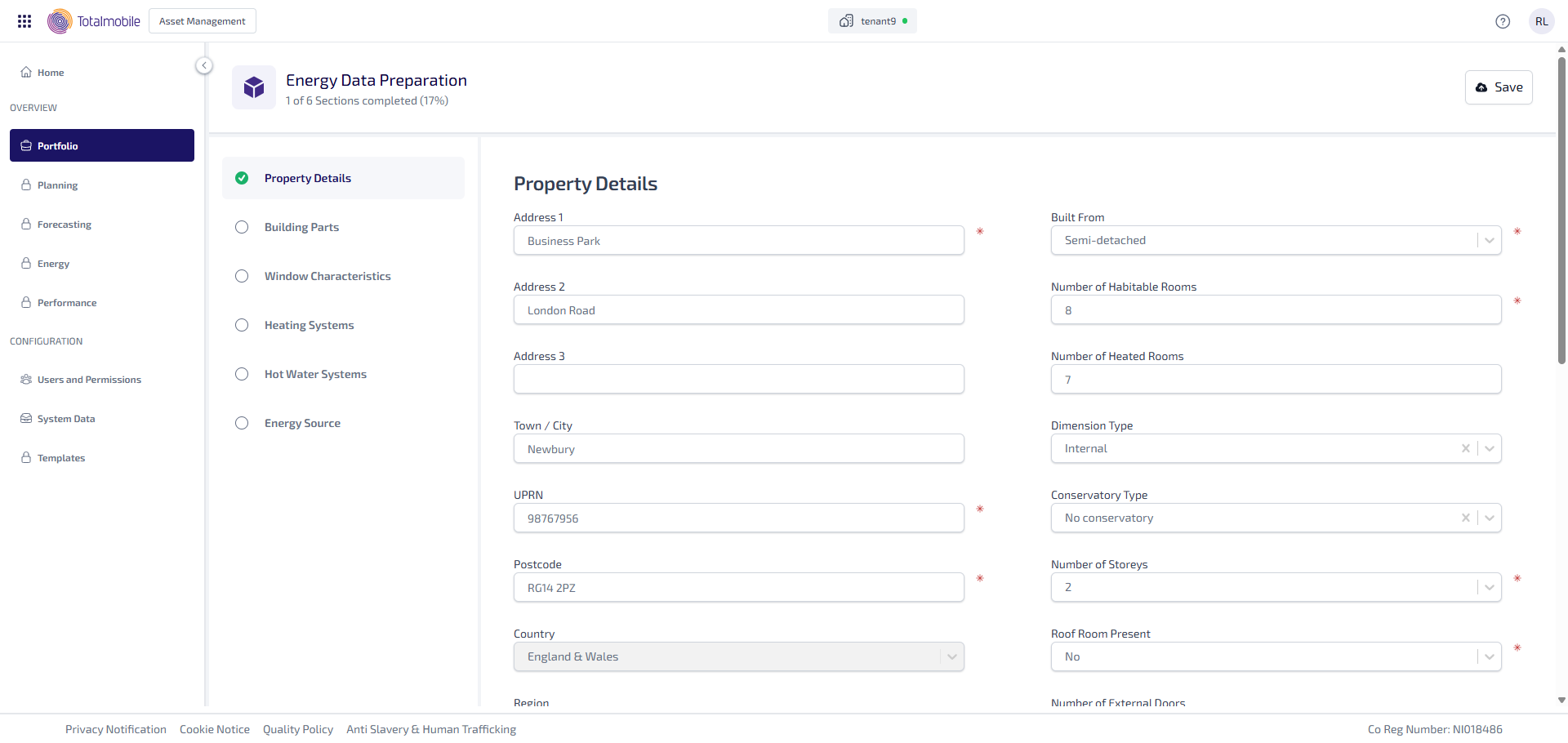
Enter the following information:
-
Enter the Address 1*-3.
-
Enter the Town / City.
-
Enter the UPRN*(Unique Property Reference Number).
-
Enter the Postcode*.
-
Select the Country* dropdown, then select either England & Wales, Scotland or Northern Ireland.
-
Region* becomes active once you select the Country. Select the Region dropdown, then select the applicable region, such as Thames or South East England . This dropdown is populated depending on the Country selected.
-
Select the Transaction Type dropdown, then select the applicable type of transaction, such as Marketed Sale or Rental.
-
Select the Tenure dropdown, then select either Owner-Occupied, Rented (Social), Rented (Private) or Unknown.
-
Select the Property Type* dropdown, then select either House, Bungalow, Flat, Maisonette or Park Home.
-
Select the Built From* dropdown, then select type of build, such as Detached or End-Terrace.
-
Enter the Number of Habitable Rooms*.
-
Enter the Number of Heated Rooms.
-
Select the Dimension Type dropdown, then select either Internal or External.
-
Select the Conservatory Type dropdown, then select either No Conservatory, Separated, No Fixed Heaters, Separated, Fixed Heaters, or Not Separated.
-
Select the Number of Storeys* dropdown, then select the number of storeys from 1 - 20.
-
Select the Roof Room Present* dropdown, then select either Yes or No.
-
Select the Number of External Doors dropdown, then select the number of external doors from 1 - 20.
-
Number of External Insulated Doors updates depending on the Number of External Doors selected. Select the Number of External Insulated Doors dropdown, then select the number of external insulated doors.
-
Insulated Door U-Value [W/(m²K)] becomes active once you select the Number of External Insulated Doors. Enter the Insulated Door U-Value [W/(m²K)].
-
Enter the Draught Proofing [%].
-
Enter the Open Fireplaces.
-
Enter the Total Number of Fixed Lighting Outlets.
-
Enter the Total Number of Low-Energy Fixed Lighting Outlets.
-
Select the Mechanical Ventilation dropdown, then select either Natural, Mechanical, Supply and Extract or Mechanical, Extract Only.
-
Select the Space Cooling System Present toggle to determine whether this is present or not.
*These are required fields.
Once the form is saved the Country, Property Type and Insulated Door U-Value [W/(m²K)] fields can no longer be updated.