Configuring Worlds in the Mendel Database
The first step of creating an Enterprise World is installing the Mendel Engine.
-
Create a dedicated Mendel folder on the server or PC which will host the Mendel service i.e. <DataDriveLetter>\TotalMobile\MendelEngine.
-
Copy the TotalmobileMendelService-pkg.exe in the Mendel folder of the build and paste it to the dedicated Mendel folder created in the previous step.
-
Extract the files. Once done this will generate a TotalMobille.Mendel.Service folder with a number of files in it.
-
Copy the TotalMobileMendelAdmin-pkg file in the Mendel folder of the build and paste it to your dedicated Mendel folder.
-
Run (as an administrator) the TotalMobileMendelAdmin-pkg file in the dedicated Mendel folder.
-
Navigate to the new Totalmobile.Mendel.Admin.Cli folder in the dedicated Mendel folder.
-
Run mdadmin.exe. This will generate the following screen:
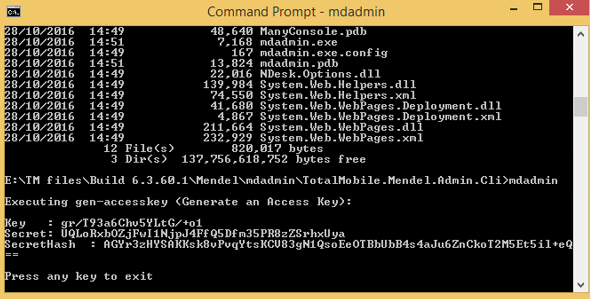
The mdadmin application will need to be run again if any special characters ( !"#$%&'()*+,-./:;<=>?@[\]^_`{|}~) are generated in the secret (especially at the start) e.g. '/ka+JY7FttdswtkPPlhbmb9+hfeHLJUYE'.
-
Record the Key, Secret and SecretHash values. These values will be needed at a later date. Close the Command Prompt window.