Sales Invoicing Configuration
Most of the configuration is done on a contract’s Invoicing tab. There is a section at the bottom for Sales Invoicing.
There is legacy functionality still in Connect for invoicing and invoice batches which is still visible as the top section of this tab. This functionality is still usable, but not compatible with the Sales Invoicing functionality.
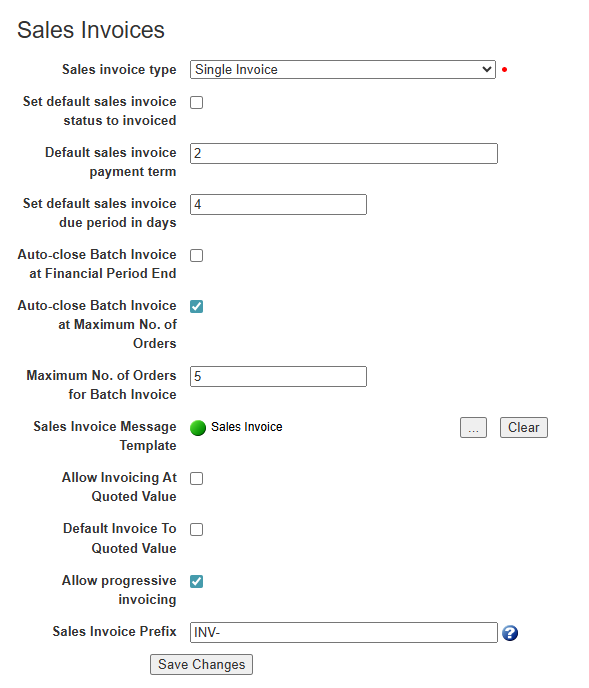
Most of the above configuration will be discussed as part of the feature it relates to later on. The generic settings are:
-
Sales Invoice Type: This is either None, Single or Batch invoice. By default it is None, but this is used to enable the functionality and set whether the contract is batching orders.
-
Default Sales Invoice Payment Term: Payment Term is a string field on an invoice, this sets the default value for invoices raised on this contract.
-
Set Default Invoice Due Period in Days: An invoice has a Due Date calculated from the day it is raised plus the number of days set here.
-
Sales Invoice Prefix: The invoice reference is automatically generated as a number counter, but can be prefixed with the provided values. In the above example, an Invoice could be generated with reference ‘INV-1234’.
Navigate to Configuration > Organisation > Organisations.
Select the required Organisation.
To add the primary address, select the Addresses tab.
Select Add Address.
The Address Details page appears.
Select the Address contact type dropdown, and select Primary.
Select Save and Exit.
To add the primary contact, select the Contacts tab.
Select Add Contact.
The Contact Details page appears.
Select the Contact type dropdown, and select Primary.
Select Save and Exit.