Catalogue User Store Control
The Catalogue User Store control allows users to add materials in a form from stores which they are assigned to. The searchable products are displayed as a list and the user can specify the quantity for each selected product.
You can add stores and assign users to them on the WebAdmin > Materials page. For more details, refer to Add a Store.
Configure the Catalogue User Store Control
-
In WebAdmin, select Forms.
-
Select an existing form, or select Add New Form to create a new one.
-
Navigate to an existing element within your form or select Insert a new Element
 .
-
Select Maintain element settings
 .
-
In the Update Element Details dialog:
-
Select the Catalogue User Store control.
-
Select the Text field, and enter a description for the control.
-
Enter the Minimum number of products that can be selected from the list. This does not restrict the quantity of each product that can be selected.
-
Enter the Maximum number of products that can be selected from the list. This does not restrict the quantity of each product that can be selected.
-
If required, enter the Mapping Source.
This is used to map additional properties to the form. When you enter an additional properties parent in this field, the children are available for visit mapping for the element. For more details refer to Mapping. -
Select Save.
The element appears in the form with a set of pre-defined sub-elements.
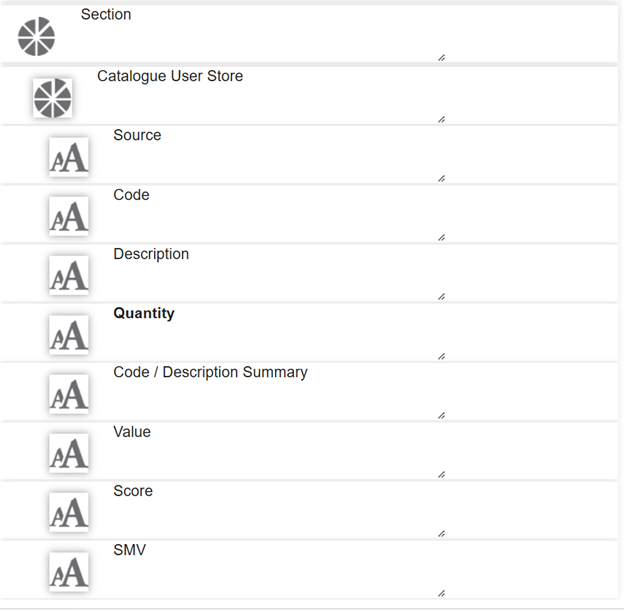
-
-
If you entered a mapping source when configuring the control:
-
In the Source field, select Maintain element mappings
 .
-
Select the Visit Mapping field, and select an additional field property from the dropdown.
-
Toggle the Direction to In, Out, or Both.
-
Select Add
 .
-
Select Save.
-
Repeat the above steps for the Code, Description, Quantity and Value fields.
-
-
Save
 and Publish
 the form.
-
Ensure the form is assigned to an application or visit task within a solution.
Using the Catalogue User Store Control
 On Android
-
On the device, navigate to the form.
-
Select the Catalogue User Store control within the form.
-
In the User Store screen:
-
Type to filter the products.
-
Tap the number to increase the quantity, or select and hold the quantity to increase in increments of 10.
-
To edit the quantity select the product. In the Enter Value screen:
-
Enter a quantity.
-
Select OK.
-
-
To discard the quantity, select and hold a product. In the Discard confirmation screen, select YES.
-
Select the tick icon.
-
-
Select Submit.
On iOS
-
On the device, navigate to the form.
-
Select the Catalogue User Store control within the form.
-
In the User Store screen:
-
Type to filter the products.
-
Tap the number to increase the quantity, or select and hold the quantity to increase in increments of 10.
-
To discard the quantity, swipe left on the product and select Clear.
-
Select Done.
-
-
Select Submit.