Lone Worker Protection - Release 9.31
Release Date: April 2025
We have been enhancing Lone Worker Protection since the last release, adding new features and addressing known issues to improve quality.
Some features may require additional setup by Totalmobile. If needed, reach out to your Account Manager for access details.
These Release Notes cover the following:
What's New
-
People List download column selection by Report Template
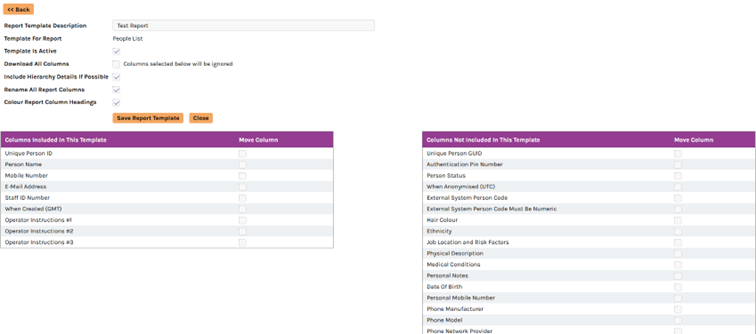
You can now set up custom columns for report downloads. You will be able to set up report templates within the management portal. These can be viewed by your log in only or shared with the full site. The reports that support this feature are
-
People list
-
People usage report
-
Alert Manager report
All other reports will use the existing download format. We will be looking to extend this feature across all reports in upcoming releases. Below are some screenshots. In the example shown, only the 9 columns on the left side will be downloaded when the download button is pressed on the people list.

-
-
Mandatory Person Fields
It is now possible to configure which fields on the person settings page are mandatory when adding or updating an existing user. These settings can be configured per user in each site and includes
-
All standard person fields
-
Custom fields
-
Hierarchy
-
Hierarchy restrictions
New report has been added “Mandatory Data Report”. This will appear if there is at least one mandatory data profile for a site. By default, this is deactivated. This report will list all users who are missing mandatory information.
-
-
Auto anonymise inactive users
Users who have been marked as inactive can now be automatically anonymised after a set period of time. The time period can be configured per site. A person can be manually queued for anonymisation by changing the person status setting on the person settings page. People who are queued to be anonymised can be viewed by choosing Inactive (To Be Anonymised) from the Person Status filter on the Person List.
-
People List User Status
The Person Status filter on the People List has been changed to a drop-down list to accommodate the new features above.
-
Active
-
Inactive
-
To Be Anonymised
-
Inactive (Missing Mandatory Data)
The Locate Now and Send Knowledge Base buttons are no longer visible to people who are not active.
-
-
Save All Button
A button to save all settings has been added to the Person Settings page.
This button does not save any of the fields relating to a person's Portal Login.