Lone Worker Protection - Release 9.36
Release Date: October 2025
We have been enhancing Lone Worker Protection since the last release, adding new features and addressing known issues to improve quality.
Some features may require additional setup by Totalmobile. If needed, reach out to your Account Manager for access details.
These Release Notes cover the following:
What's New
-
PROT-411, 400 – Customer API Reporting
We are pleased to announce our latest major product enhancement. A customer reporting API that allows you to automatically pull reporting data direct from our platform and enabling seamless integration with your internal systems.
With this new capability you can:
-
Schedule automated data retrieval
-
Save time by eliminating manual exports
-
Ensure accuracy with consistent up to date data
-
Integrate this data in your existing BI or analytics systems
-
Scale effortlessly as reporting demands grow
-
Retrieve data whenever you need it. Monthly, weekly, daily or even down to the minute.
The following reports are available upon release:
-
People list (active people only)
-
People Usage Report
-
Alert Manager Report
-
GPS Data Report
-
GPS Device List (active devices only)
Totalmobile can provide a postman file containing example requests if required.
Please note this feature may come at an additional cost, if you wish to learn more reach out to your account manager or your contact within Totalmobile.
-
-
PROT-349 – New Latest Event Report (Portal Access)
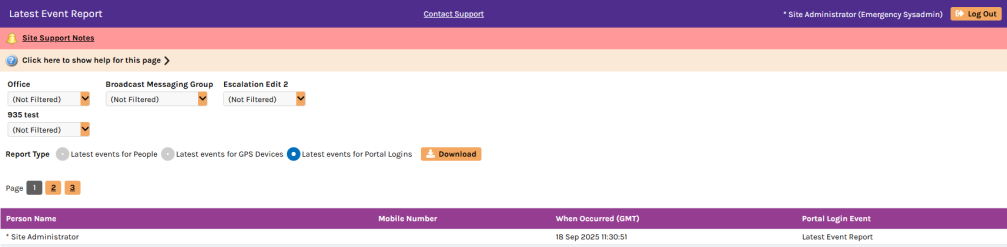
We have added portal reporting onto the latest event report. The report will now have the latest event for users, devices and access to the management portal. The portal logins option will now show the last page that users accessed on the management site and the date and time. See the screenshot below for an example.
-
PowerBi Report Enhancement
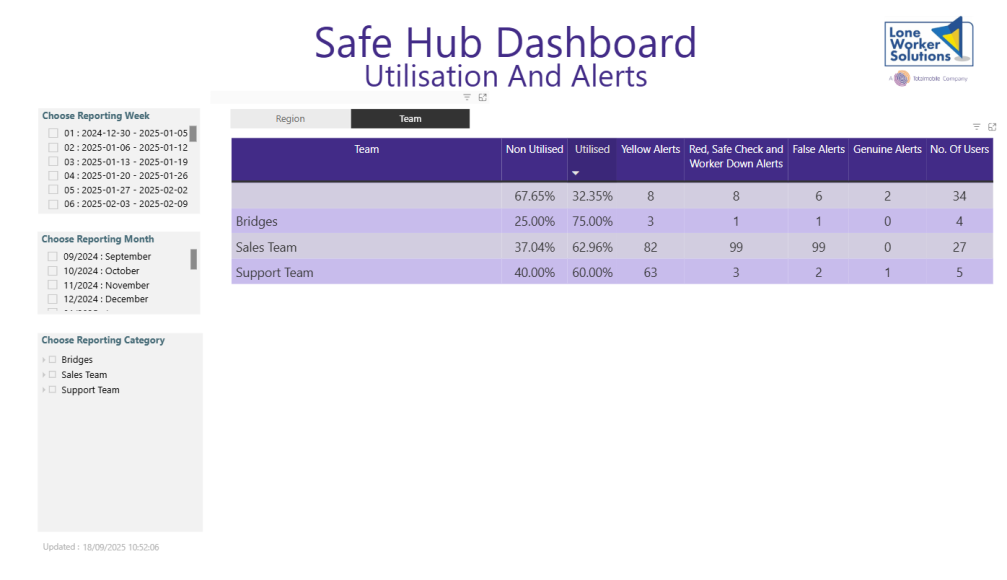
There is now an option on the Utilisation and Alerts page to choose which hierarchy is displayed on the utilisation summary table. Previously this would only show one hierarchy option and no ability for customers to change this. The enhancement allows clients to quickly be shown a summary of the different organisation levels built into the platform. Please note this is not enabled as standard, contact support to have this feature turned on for your report. Below are some screenshots showing the two hierarchy options we have on our demo system as an example.

Fixes
|
Ref |
Description |
|---|---|
|
PROT-293, 326, 675 |
Usage Dashboard - The usage dashboard in the management portal now only shows devices that exist within each customer site. The devices detail pop-up has been updated with the corresponding corrections. |
|
PROT-685 |
Authenticator App Deployment (Internal only) - We have implemented the use of authenticator apps on our internal admin site. The idea is to test this internally before adding this as an authentication method for customers to access the management portal in a future release. |
|
PROT-679 |
What3Words Audit - All what3words requests made by Android app v2.05.02 onwards are made by request to the main Protect server. This allows an audit to be recorded of all what3words requests. A report of usage is available in the support administration portal under the "Geo Webservices Audit" page. |
|
PROT-695* |
Fixed Usage Calc Bug - A situation where usage calculation could be duplicated for people for one day has been resolved. A validation report has been created to automatically verify that the usage calculation is completed for all sites every day. |
|
PROT-677* |
VOIP Server Upgrade - 3CX VOIP server has been upgraded with v20 update 6. |
|
PROT-684, 694* |
Performance Improvements - Additional performance improvements have been made in this release. |
*Internal Changes