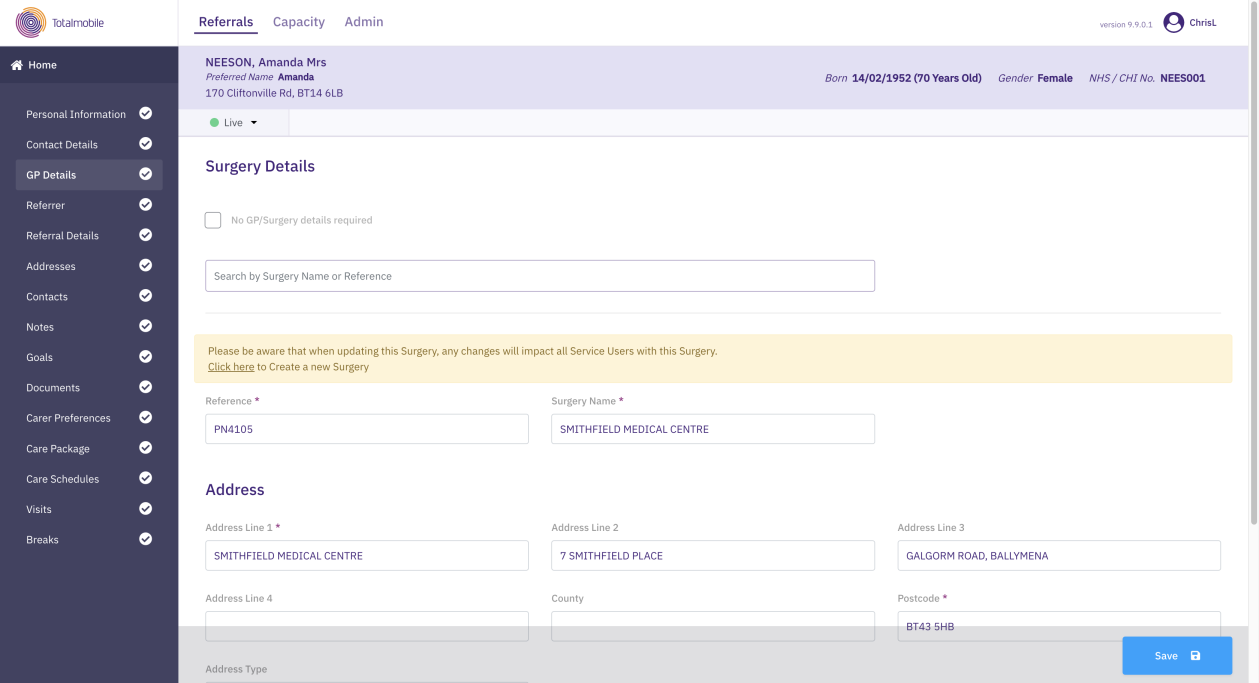
Manage GP Details
GP details are not mandatory and can be omitted if not required or not relevant to a service user's care.
You can search for GP or surgery details that have been previously added to Referral Management (Carelink).
To add or update a service user's GP details:
-
On the Referrals tab, select a referral for the required service user.
-
In the Referral Summary panel, select Edit.
-
On the referral's navigation menu, select GP Details.
-
If the service user does not currently have GP details and you wish to add them, clear the No GP/Surgery details required checkbox.
-
Optionally, search for a surgery that has previously been added to Referral Management (Carelink) by its name or reference. When you select a surgery from the search results, this populates the fields on the page.
-
Enter or update the following:
-
Reference*
-
Surgery Name
-
Address Line 1*
-
Address Line 2, Address Line 3, Address Line 4, County
-
Address Type
-
Postcode*
-
Phone Number and Email Address
If you are updating existing surgery details, note that the changes will be populated to all service users associated with this surgery.
-
-
Select Save.
* Required field.