Commit a Job
-
In WebAdmin, select Optimise Schedule.
The Worlds window appears.
-
Select a World.
The Optimise Schedule window appears.
-
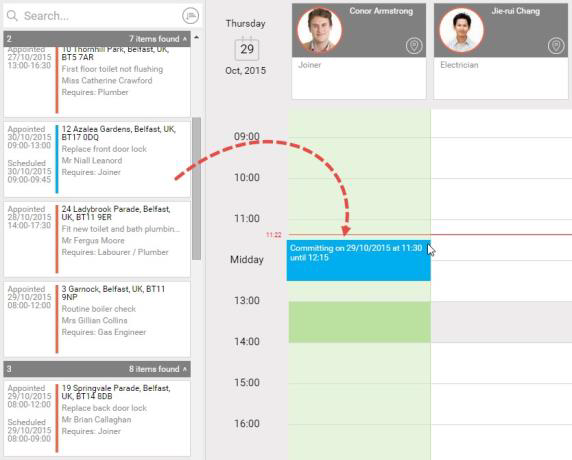
In the Job List, click and drag a job from the pile to a resource's Diary.
-
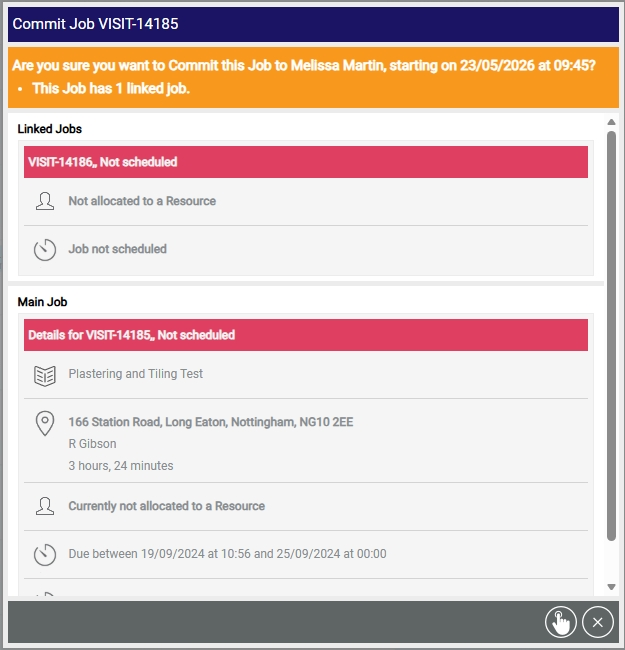
If you are committing a job that requires further confirmation, a dialog appears. This dialog contains:
-
Scheduled time.
-
Current committed time (where applicable).
-
Any constraints requiring review.
-
Linked job information. If the job being scheduled has linked jobs, the dialog also displays:
-
Details of those linked jobs.
-
Their assigned resources (if applicable).
-
-
-
If required, review any constraints and select a reason code for overriding them.
-
Select Commit Job
 .
.
Once a job is committed, it cannot be rescheduled by Mendel unless it is decommitted.