Loan Resources to Other Worlds
The following example shows a WebAdmin administrator of a North Belfast World loaning a resource to a South Belfast World for an afternoon (four hours):
-
In WebAdmin, select Optimise Schedule.
The Worlds page appears.
-
Select a World.

The Optimise Schedule page appears.
-
Select Record Loan
 .
. -
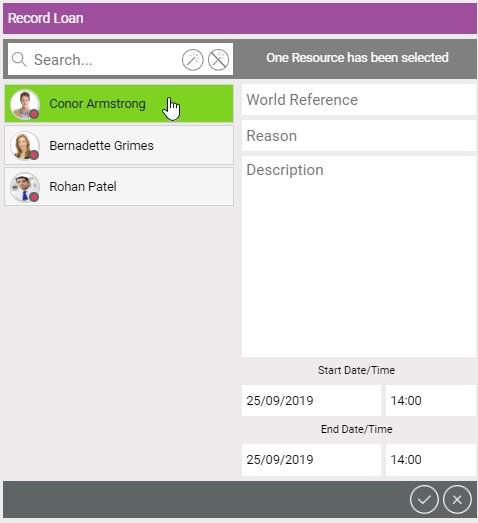
In the Record Loan dialog:
-
To filter the resources, select the Search field and type a resource name.
Select the Select All icon
 , or the Deselect All icon
  .
.Or select individual resources for loaning.
-
Select the World Reference field and select a World from the dropdown, for example South Belfast.
-
Select the Reason field and select a Reason from the dropdown.
-
Enter a Description.
-
Toggle Clear Overlapping Jobs to on or off to define whether any jobs that overlap the loan times should be cleared from the resource's schedule.
-
Enter the Start Date/Time of the loan.
-
Enter the End Date/Time of the loan.
-
Select Save Loan Details.
-
The North Belfast World Optimise Schedule page updates and shows the unavailability of the selected resource within the World:
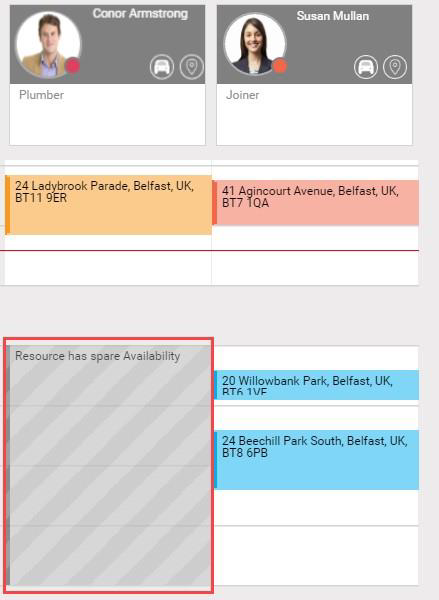
When you manually refresh the South Belfast World Optimise Schedule page, the loan of the resource displays within the World. You or Mendel can schedule jobs to the resource within the available loan time