Retract Loan of Resources to Other Worlds
The following example shows a WebAdmin administrator of a North Belfast World retracting the loan of a resource to a South Belfast World.
If you retract the loan of a resource from another World, and jobs have already been dispatched to that resource in the other World, ensure you recall the jobs from the resource. Otherwise, the resource will still have visits for a World they are not working in and also be scheduled jobs for their primary World.
-
In WebAdmin select Optimise Schedule.
The Worlds page appears.
-
Select the World that the resource is originally assigned to - for example North Belfast.

The Optimise Schedule page appears.
-
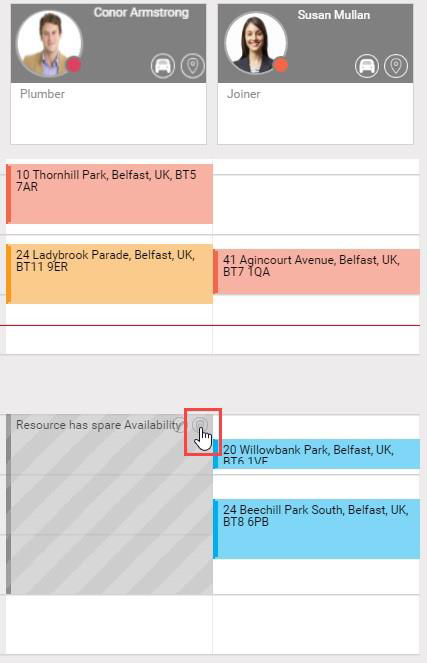
Select Retract on a period of Unavailability for a loaned Resource.
-
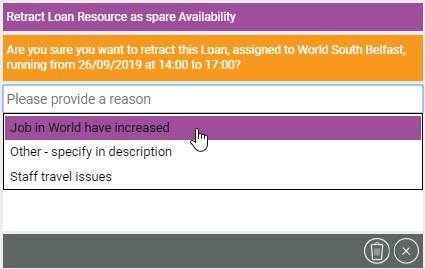
In the Retract Loan window:
-
Select the Please provide a reason field and select a Retract Reason from the dropdown.
-
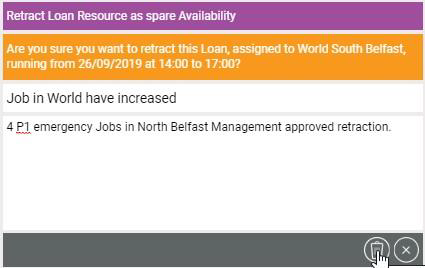
Select Retract Loan.
-
The North Belfast World Optimise Schedule page updates and shows the availability of the resource within the World.