Synchronise the Scheduler and Mendel Database Tables
The Mendel changes need to be synchronised across the databases. This is done via the TK_TM_SYNC_MENDEL stored procedure under the Scheduler Database.
To run this:
-
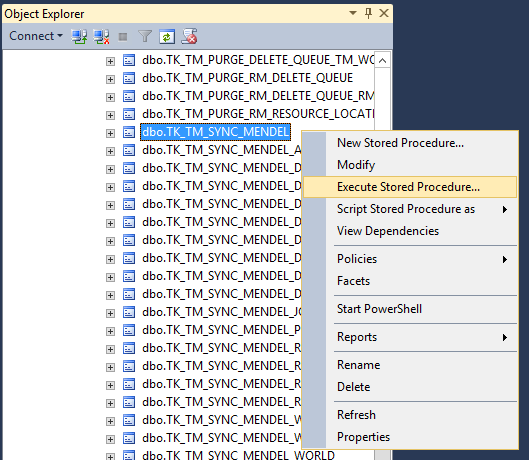
Expand Scheduler DB > Programmability > Stored procedures > dbo.TK_TM_SYNC_ MENDEL.
-
Right-click dbo.TK_TM_SYNC_ MENDEL and select Execute Stored Procedure.
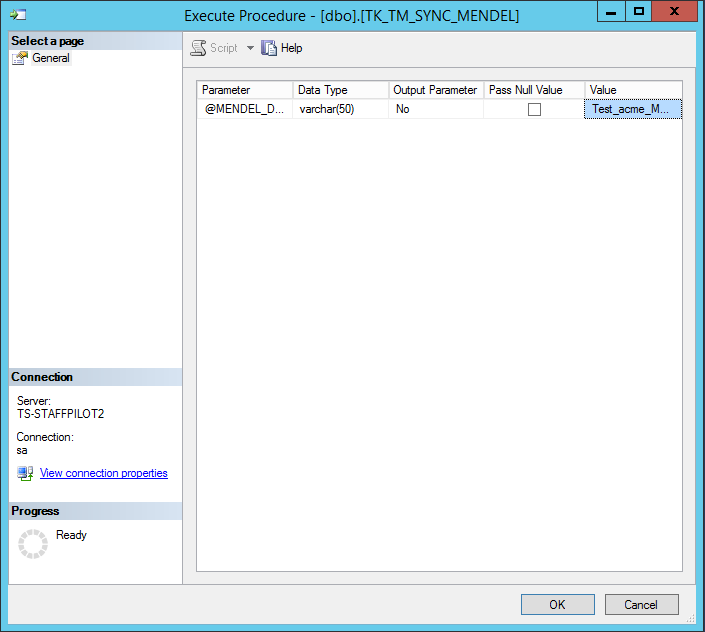
A dialog appears requesting the name of the Mendel database.
-
Enter the database name and select OK.
The changes are synchronised.
This procedure is required for each world to be set up.
You can set up additional Worlds by adding another line to the dbo.World and dbo.AccessKey tables, then running the TK_TM_SYNC_MENDEL stored procedure again.