Visit Statuses
You can assign a colour to each job visit status in a World.
When a visit status is assigned to a job as part of a workflow, the defined colour is displayed in the following places:
-
The job card in the Diary.
-
The header bar in the Job Details dialog.
-
The job pin in Map view.
-
The job display in Gantt view.
For more details refer to the Schedule User Guide.
You need the Visit Statuses permission to access this feature. For more details refer to Permissions.
Add a Visit Status
-
In WebAdmin select Optimise Admin.
The Optimise Admin page appears.
-
Select a World.

The World Settings and Permissions page appears.
-
In the Settings section, select Visit Statuses.
-
Select Add New Visit Status
 .
. -
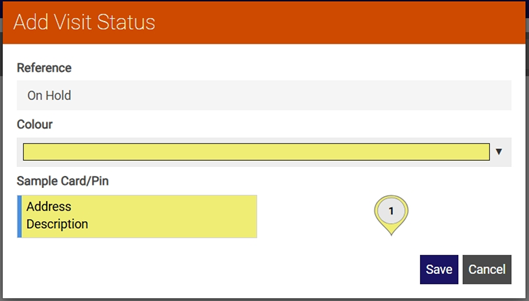
In the Add Visit Status dialog:
-
Select the Reference field and enter a job visit status reference, for example Accept or Arrived.
-
Select the Colour field, then select a colour from the dropdown. You can choose a colour from the predefined options, or select your own from the colour wheel.
Once you have selected a colour, the dialog updates to show how a job card and pin will appear.
-
-
Select Save.