Add Publisher Queues
Publisher message queues group together related messages or Totalmobile features, and contain adapters which often poll folders, web services and databases for information to receive. For example, if you want adapters to poll a folder for XML files which will generate messages in Totalmobile for Dynamic Scheduling, such as CreateJobRequest messages, it is best practice to create a queue which groups together the adapters and their function.
Add a Queue
-
In WebAdmin select Integration.
-
Under Integration Instances, select an instance.
Use the Search field to filter the list of instances.
The Integration Instance Configuration page appears.
-
Select Publishers
 .
. -
Select Add Queue
 .
.
-
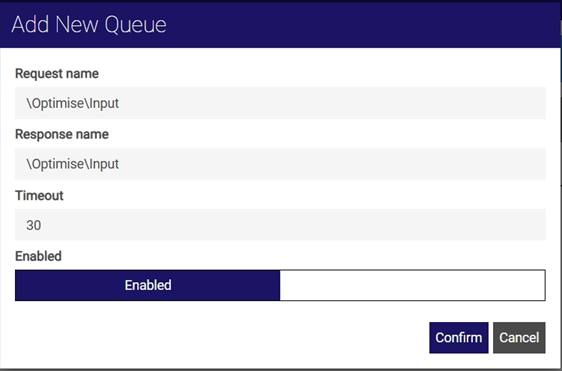
In the Add new queue dialog:
-
Enter a Request name.
-
Enter a Response name.
-
Enter a Timeout value. This defines how often the publisher queue adapters poll for information.
-
By default, the queue is enabled. If required, toggle the Enabled setting to disable it.
-
Select Confirm.
Only the Response name and Timeout are required for publisher queues. The Request name is the name of the subscriber queue which is used for input. You can enter anything for your publisher queue Response name, but the format \function\DirectionOfMessages is recommended, for example \Optimise\Input.
The publisher queue is added to the integration instance.

-