Visit & Bulletin Filters
Property & Value
The properties, and associated values, available for the Visit and Bulletin snippets determine what is shown to the user when they tap on a snippet.
Visit Properties & Values
These are the properties and associates values for the Visit snippets:
|
Property |
Description |
Value |
|---|---|---|
|
Priority |
Free Text |
|
|
Complete |
Free Text Note: This will be updated so you select from either ‘Complete’ or ‘Not Complete’. |
|
|
Scheduled Start |
The date the visit has been scheduled for and therefore, when the visit should take place. |
Free Text |
|
WorkType (Reference) |
The WorkType is created as part of a Solution; if a Solution integrates with Visits, a workflow must be setup, and this is what generates the Work Type Description and Name (Reference). These are only used for the integration, and only one WorkType can be associated with a Solution. |
Free Text. The text must match the reference created against the Solution exactly, for more information see Add a Layout. Note: This will be updated to be a lookup from the Solution. |
|
WorkType (Description) |
||
|
Status (DisplayAs) |
Categorizes the state of the visit and where it is within the lifecycle of the visit. |
New, Outstanding, History |
|
Status (Code) |
This is a user defined action which can be mapped to DisplayAs, and shows where this visit is within the lifecycle of the visit. |
Free Text |
Bulletin Properties & Values
These are the properties and associates values for the Bulletin snippets:
|
Property |
Description |
Value |
|---|---|---|
|
Subject |
Free Text |
|
|
Category |
Free Text |
|
|
Read |
Indicates the read state of the message, e.g. so the user can see if there are any messages which remain unread. |
Free Text Note: This will be updated so you select from either ‘Y’ or ‘N’. |
|
Complete |
Free Text Note: This will be updated so you select from either ‘Complete’ or ‘Not Complete’. |
Operators
The operators specify the how the property and the value relate to each other. These are the available operators:
|
Operator |
Description |
|---|---|
|
= (Equals) |
This indicates the property has a value which is exactly the same as the input value, e.g. show all visits with a company name equal to Totalmobile. |
|
is null |
This indicates the property has no value associated with it, e.g. show all visits where there is no schedule start date. |
|
is not null |
This indicates the property has a value associated with it, e.g. show all visits with a schedule start date. |
Complex Filters
When creating a complex filter it is important to choose the correct operator (the AND/OR keywords) as they come with their own set of rules. To illustrate the different outcomes the below two expressions will be used.
-
Status (DisplayAs) = N OR Priority = 1
-
Status (DisplayAs) = N AND Priority = 1
With complex expressions, they can be broken down into separate simple expressions with each expression having a result of either True or False. The true or false result will indicate whether the visit is displayed or not. Below is a sample table of different values and result of the expression.
-
Status (DisplayAs) = N
|
Example Visit Value |
Result |
|---|---|
|
N |
True |
|
H |
False |
|
O |
False |
-
Priority = 1
|
Example Visit Value |
Result |
|---|---|
|
1 |
True |
|
2 |
False |
|
1O |
False |
|
High |
False |
Status (DisplayAs) = N OR Priority = 1
This expression is designed to display all the visits that have a priority of ‘1' or a status with a display value of 'N’. Therefore any sub simple expression that has a result of True will mean the overall expression result will be True.
|
SUB EXPR 1 VALUE |
SUB EXPR 1 RESULT |
SUB RULE 2 VALUE |
SUB RULE 2 RESULT |
OVERALL RESULT |
|---|---|---|---|---|
|
N |
True |
10 |
False |
True |
|
H |
False |
High |
False |
False |
|
O |
False |
1 |
True |
True |
|
N |
True |
1 |
True |
True |
Status (DisplayAs) = N AND Priority = 1
This expression is designed to display all the visits that have a priority of ‘1' and a status with a display value of 'N’. Therefore both sub simple expression must have a value of True for the overall expression to be True.
|
SUB EXPR 1 Value |
SUB EXPR 1 RESULT |
SUB EXPR 2 VALUE |
SUB EXPR 2 RESULT |
OVERALL RESULT |
|---|---|---|---|---|
|
N |
True |
10 |
False |
False |
|
H |
False |
High |
False |
False |
|
O |
False |
1 |
True |
False |
|
N |
True |
1 |
True |
True |
Complex Rule Summary
|
SUB EXPR 1 |
SUB EXPR 2 |
1 AND 2 |
1 OR 2 |
|---|---|---|---|
|
True |
True |
True |
True |
|
True |
False |
False |
True |
|
False |
True |
False |
True |
|
False |
False |
False |
False |
Example Filters
Visit Filters
 Default Visits
This configuration means the snippet will show only visits with a ‘Priority’of ‘New’ OR with a ‘Status’ of ‘Outstanding’.
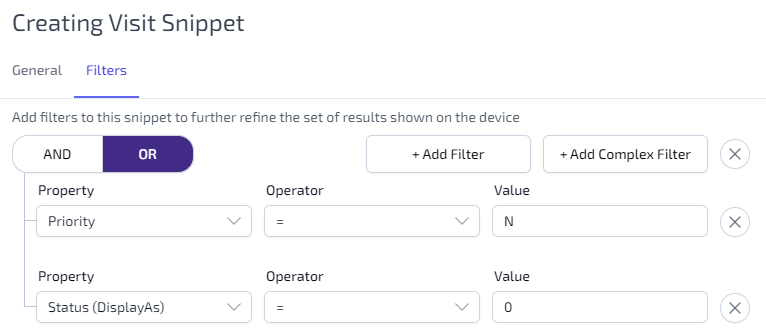
To configure this filter:
-
Click +Add Complex Filter.
-
Ensure OR is selected.
-
Click +Add Filter and select the following:
-
Priority from the Property dropdown list.
-
= from the Operator dropdown list.
-
Enter N into the Value field.
-
-
Click +Add Filter and select the following:
-
Status (DisplayAs) from the Property dropdown list.
-
= from the Operator dropdown list.
-
Enter O into the Value field.
-
Unscheduled & New or Outstanding Visits
This configuration means the snippet will show only visits without a ‘Scheduled Start’ AND visits with a ‘Status’ of 'Outstanding' OR ‘New’.
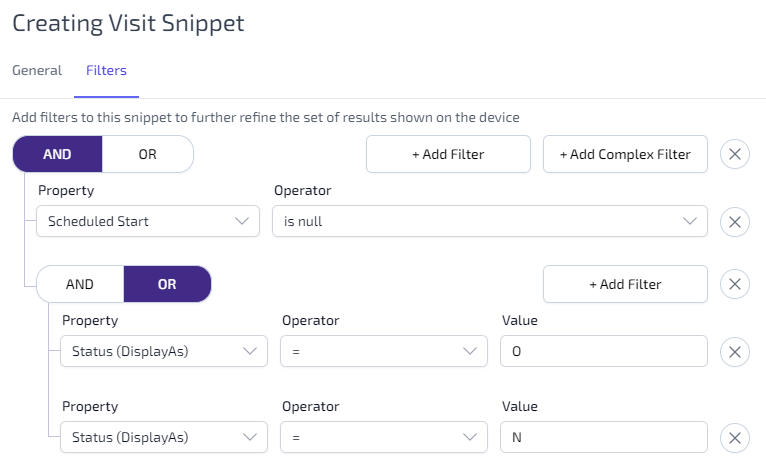
To configure this filter:
-
Click +Add Complex Filter.
-
Ensure AND is selected.
-
Click +Add Filter and select the following:
-
Scheduled Start from the Property dropdown list.
-
is null from the Operator dropdown list.
-
-
Click +Add Complex Filter.
-
Ensure OR is selected.
-
Click +Add Filter and select the following:
-
Status (DisplayAs) from the Property dropdown list.
-
= from the Operator dropdown list.
-
Enter O into the Value field.
-
-
Click +Add Filter and select the following:
-
Status (DisplayAs) from the Property dropdown list.
-
= from the Operator dropdown list.
-
Enter N into the Value field.
-
New & Outstanding Visits at a Status of Hold
This configuration means the snippet will show only visits at a status of ‘Hold’ which are also 'Outstanding' OR ‘New’.
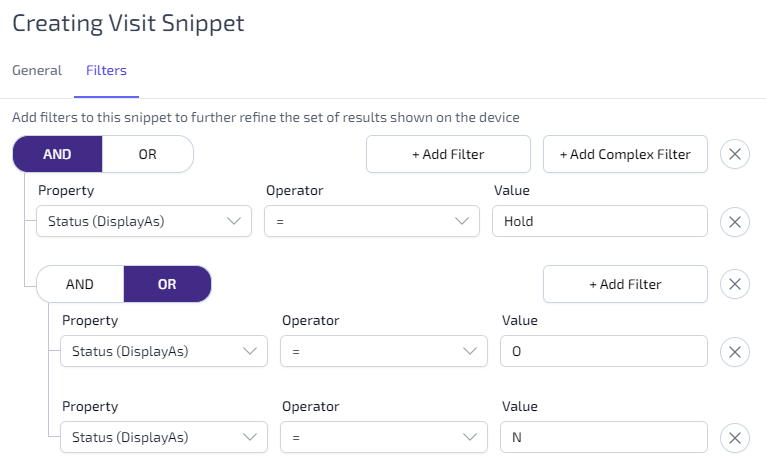
To configure this filter:
-
Click +Add Complex Filter.
-
Ensure AND is selected.
-
Click +Add Filter and select the following:
-
Status (DisplayAs) from the Property dropdown list.
-
= from the Operator dropdown list.
-
Enter Hold into the Value field.
-
-
Click +Add Complex Filter.
-
Ensure OR is selected.
-
Click +Add Filter and select the following:
-
Status (DisplayAs) from the Property dropdown list.
-
= from the Operator dropdown list.
-
Enter O into the Value field.
-
-
Click +Add Filter and select the following:
-
Status (DisplayAs) from the Property dropdown list.
-
= from the Operator dropdown list.
-
Enter N into the Value field.
-
Bulletin Filters
Default Inbox
This configuration means the snippet will show only visits with a ‘Read’ state of ‘New’.
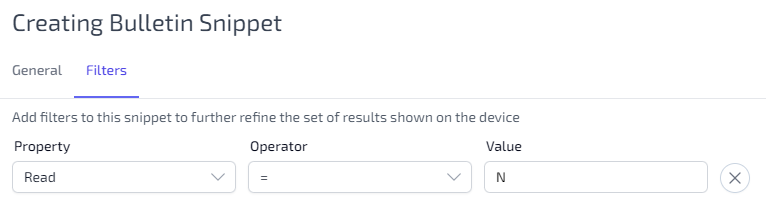
To configure this filter:
-
Click +Add Filter.
-
Select Read from the Property dropdown list.
-
Select = from the Operator dropdown list.
-
Enter N into the Value field.