Asbestos
The Asset Details > Asbestos tab shows you up to date information from Job Management (Connect), about the asbestos status and risk for assets marked as a property.
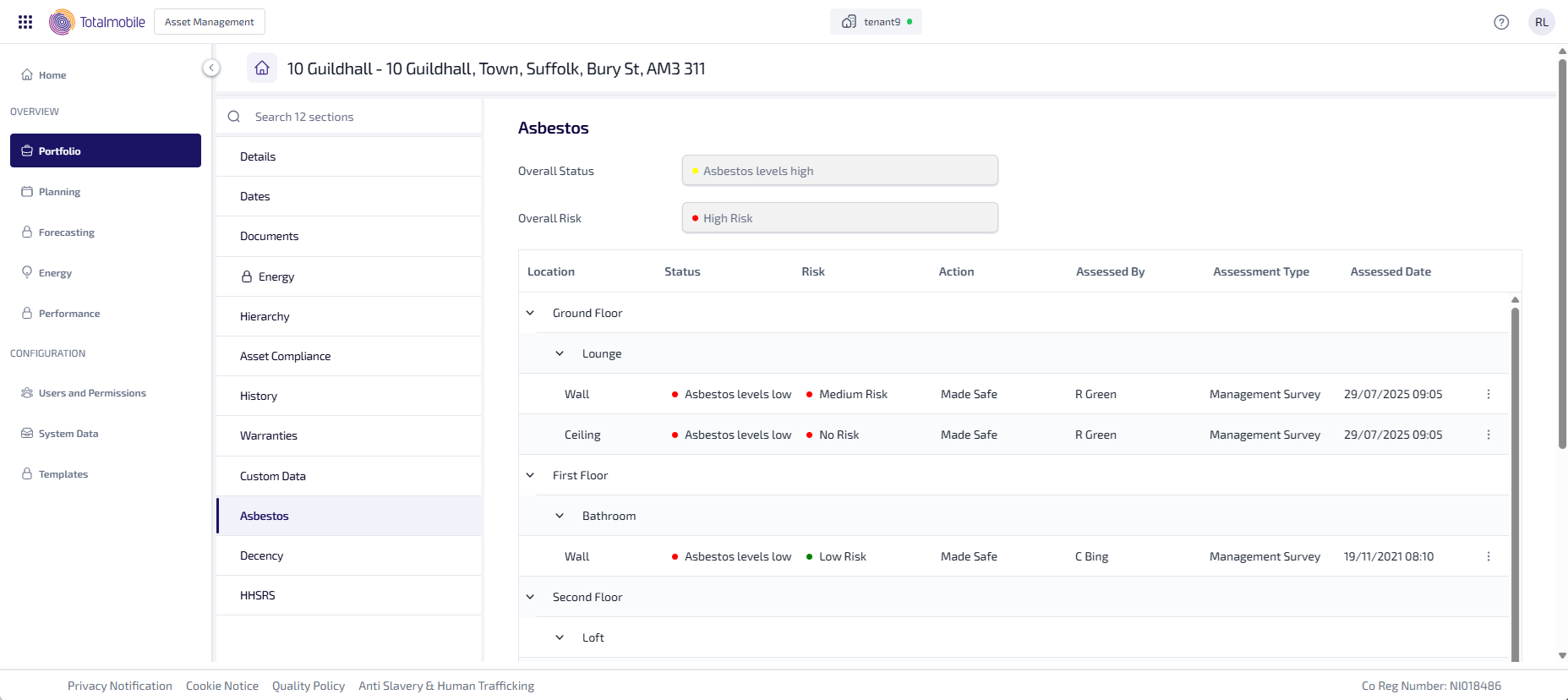
The Asbestos tab shows the following information:
-
Overall Status - the overall asbestos status for the whole property, for example whether there is asbestos or not.
-
Overall Risk - the overall asbestos risk for the whole property, for example has the asbestos been disturbed.
-
Location - shows a structured tree with the level of the property, the room on the level, and the location in the room. Select
 to collapse the location and hide the structured tree from view.
 -
Status - the asbestos status for the location, for example whether there is asbestos or not.
-
Risk - the asbestos risk for the location, for example has the asbestos been disturbed.
-
Action - the action taken for the location, for example the asbestos has been removed, or made safe.
-
Assessed By - the name of the assessor who carried out the asbestos assessment.
-
Assessment Type - the type of assessment carried out, typically either a Refurbishment Survey or Management Survey.
-
Assessed Date - the date and time the asbestos assessment was carried out.
-
 - select to see the options menu:
-
View Asbestos - select to open the Asbestos Report.
-