Authentication
The authentication methods, and SCIM interface, used to access Field First are as follows:
The diagrams below provide an example of the capabilities which can be accessed via Field First, this is not an exhaustive list of the Totalmobile capabilities.
For further details refer to Totalmobile's Authentication Recommendations .
Single Sign-On via Field First’s Identity Server
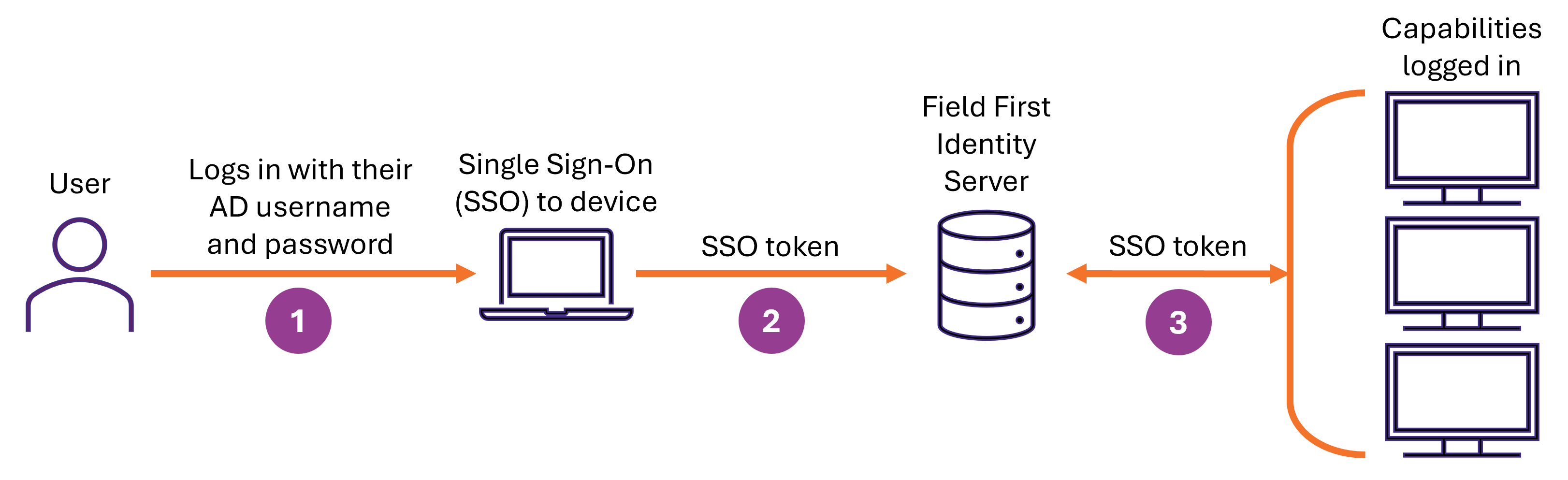
These are the steps carried out when using Field First’s Identity Server:
-
User logs in to Field First with their Active Directory username and password.
-
The Single Sign-On token checks the login details against the Field First Identity Server.
-
When the Field First Identity Server confirms the login details are correct, it checks to see which capabilities they have access to and automatically logs them in.
Single Sign-On via Federated Authentication
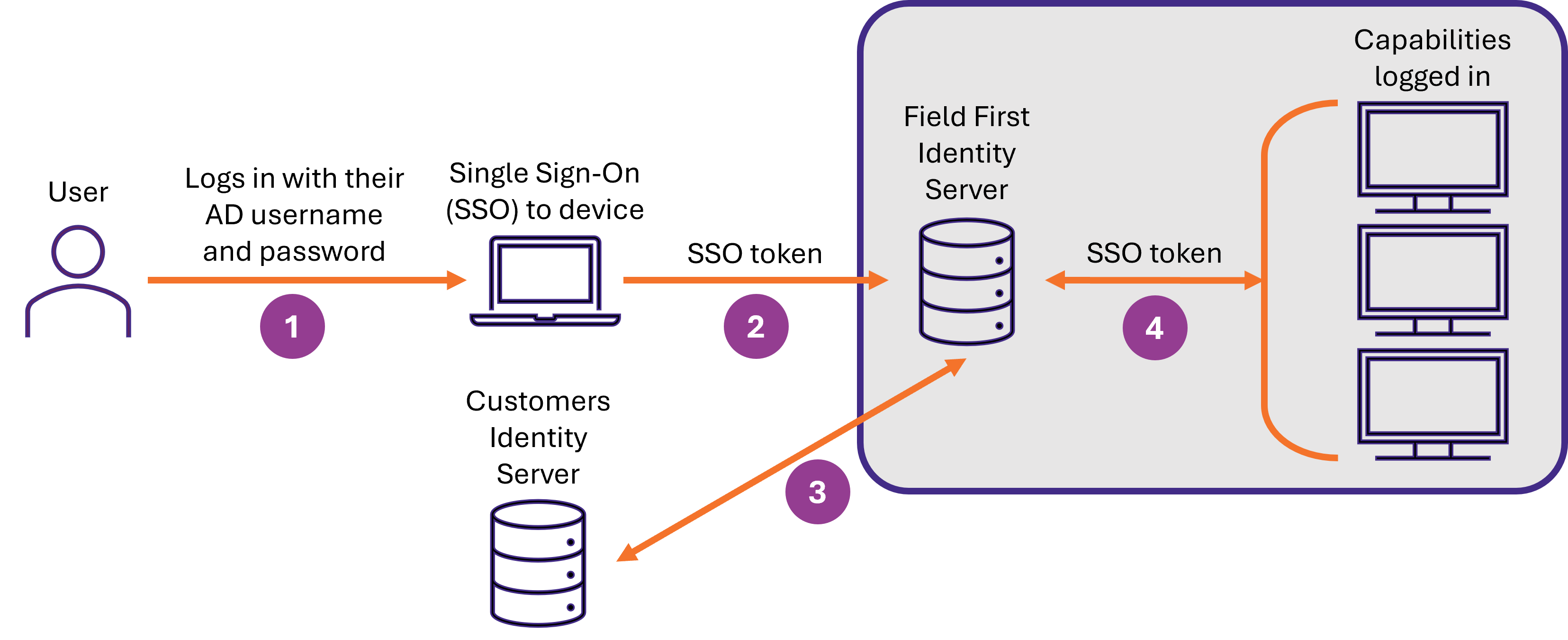
These are the steps carried out when using your organisations Identity Server to federate against:
-
The user logs into Field First with their Active Directory username and password.
-
A Single Sign-On token is sent to the Field First Identity Server.
-
The Field First Identity Server checks the users login details against your organisations Identity Server, and confirmation of the login details being correct is returned to the Field First Identity Server.
-
The Field First Identity Server checks to see which capabilities they have access to and automatically logs them into them.
System for Cross-domain Identity Management (SCIM) Interface
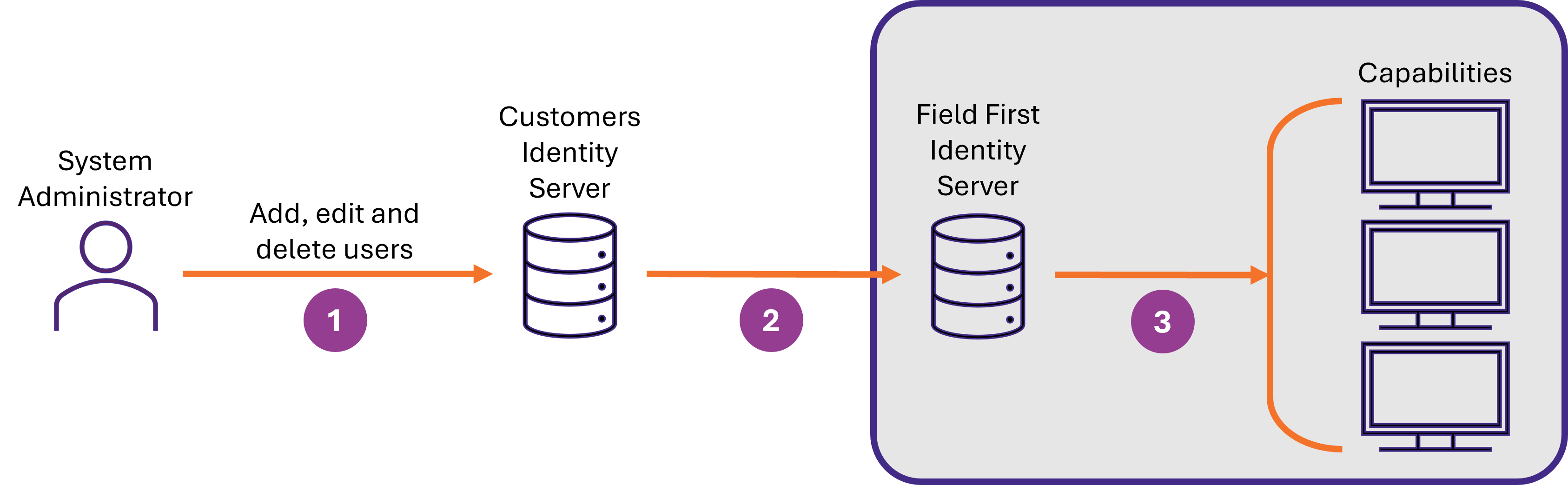
These are the steps carried out when using a SCIM interface:
-
An employee is added, updated, or deleted in your Identity Server.
-
These changes are pushed from your Identity Server to the Field First Identity Server.
-
The Field First Identity Server pushes these changes to your capabilities.
-
The super user then updates the users permissions within the capability.
For further details refer to Configure Your SCIM - Azure Entra ID.
Authentication Recommendations
The following are Totalmobile's authentication recommendations for each capability accessed through Field First:
 Asset Management
|
Existing Customer Recommendation |
New Customer Recommendation |
|---|---|
|
Single Sign-On via Federated Authentication enabled with the SCIM interface. |
Single Sign-On via Federated Authentication enabled with the SCIM interface. |
Job Management (Connect)
Mobile Users (Connect Mobile)
|
Existing Customer Recommendation |
New Customer Recommendation |
|---|---|
|
Continue to use local authentication. |
|
Mobile Users (Mobilise)
The Mobile authentication can be configured separately from the Office users, however all mobile users will need to be configured at the same time. SSO for mobile users will only become enabled after the user has reactivate their device, this means we can stage the roll-out of SSO.
When enabling Federated Authentication to a 3rd party Identity Server, Field First requires the username to be unique, typically this will be an email address. This may not be the case for existing customers. If the mobile username changes as part of the migration to Field First the mobile users will need to be updated with the new username. The users need to be configured with a valid email address, this can be a company email address, or a private email address, and must be globally unique.
|
Existing Customer Recommendation |
New Customer Recommendation |
|---|---|
|
Unless there is a strong reason to migrate mobile users during the Field First migration, we suggest local authentication remains. Mobile users can be migrated in a future phase. |
Single Sign-On via Federated Authentication enabled with the SCIM interface. |
Office Users
Office Users will see the most benefit from migrating to Field First. The SCIM interface can be used to sync users to your Identity Server and automatically add them to your capabilities. You will still need to apply the correct user permission in Job Management and Field First. We need to confirm each user exists in your Identity Server with a valid email address.
|
Existing Customer Recommendation |
New Customer Recommendation |
|---|---|
|
Single Sign-On via Federated Authentication enabled with the SCIM interface. |
Single Sign-On via Federated Authentication enabled with the SCIM interface. |
Subcontractors
Subcontractors authenticate against the local instance Job Management, unless you have created a valid account in the Identity Server to externally authenticate them.
|
Existing Customer Recommendation |
New Customer Recommendation |
|---|---|
|
Subcontractors authenticate locally with no change. Field First currently offers no additional benefit to subcontractors, we suggest local authentication remains. |
|
Totalmobile is reviewing the process for migrating subcontractors in a future release to support Multi-Factor Authentication (MFA).
Referral Management (Carelink)
Office Users will see the most benefit from migrating to Field First. The can be used to sync users to your Identity Server and automatically add them to your capabilities. You will still need to apply the correct user permission in Job Management and Field First. We need to confirm each user exists in your Identity Server with a valid email address.
|
Existing Customer Recommendation |
New Customer Recommendation |
|---|---|
|
Single Sign-On via Federated Authentication enabled with the SCIM interface. |
Single Sign-On via Federated Authentication enabled with the SCIM interface. |
Dynamic Scheduling (Optimise)
Office Users will see the most benefit from migrating to Field First. The SCIM interface can be used to sync users to your Identity Server and automatically add them to your capabilities. You will still need to apply the correct user permission in Job Management and Field First. We need to confirm each user exists in your Identity Server with a valid email address.
|
Existing Customer Recommendation |
New Customer Recommendation |
|---|---|
|
Single Sign-On via Federated Authentication enabled with the SCIM interface. |
Single Sign-On via Federated Authentication enabled with the SCIM interface. |
Mobile Working (Mobilise)
The Mobile authentication can be configured separately from the Web Admin users.
When enabling Federated Authentication to your Identity Server, the email address in Web Admin must match the email address in your Identity Server which is supplied in the Claim. This may not be the case for existing customers. If the mobile username changes as part of the migration to Field First the mobile users will need to be updated with the new username. The users need to be configured with a valid email address, this can be a company email address, or a private email address, and must be globally unique.
|
Existing Customer Recommendation |
New Customer Recommendation |
|---|---|
|
Unless there is a strong reason to migrate mobile users during the Field First migration, we suggest local authentication remains. Mobile users can be migrated in a future phase. |
Single Sign-On via Federated Authentication enabled with the SCIM interface. |
Totalmobile are looking to improve the activation process for mobile users in a future release.
Field Service Intelligence
|
Existing Customer Recommendation |
New Customer Recommendation |
|---|---|
|
Single Sign-On via Federated Authentication enabled with the SCIM interface. |
Single Sign-On via Federated Authentication enabled with the SCIM interface. |