Multiple Choice Control
The Multiple Choice control allows you to select one answer from a multiple choice per form field.
Configure the Multiple Choice Control
-
In WebAdmin, select Forms.
-
Select an existing form, or select Add New Form to create a new one.
-
Navigate to an existing element within your form or select Insert a new Element
 .
-
Select Maintain Element Settings
 .
-
In the Update Element Details dialog:
-
Select the Multiple Choice control.
-
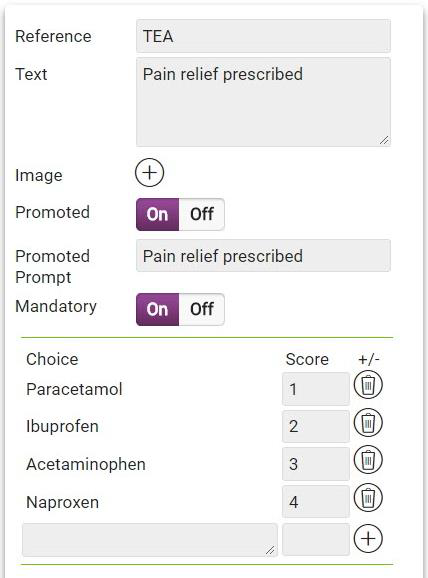
Select the Text field, and enter a description for the new control.
-
To create the multiple choice options:
-
Select the Choice field, and enter a multiple choice value.
-
To include the choice as part of a calculation for a subsequent Score control, select the Score field and enter a score value. For more details refer to Configure the Score Control.
-
Select Add
 .
-
Repeat the above steps to add further values.
-
-
If required, select the Default Value field and enter a default choice option if none are selected.
-
Configure other control options as required. For more details refer to Form Sections and Controls.
-
Select Save.
-
-
Save
 and Publish
 the form.
-
Ensure the form is assigned to an application or visit task within a solution.
 Using the Multiple Choice Control on Android
-
On the device, navigate to the form.
-
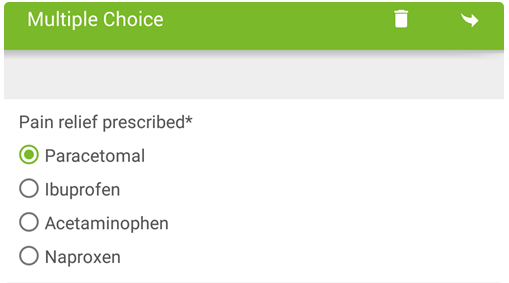
Select the Multiple Choice control within the form.
The Multiple Choice options appear.
-
Select an option as required.
-
Submit the form.
Using the Multiple Choice Control on iOS
-
On the device, navigate to the form.
-
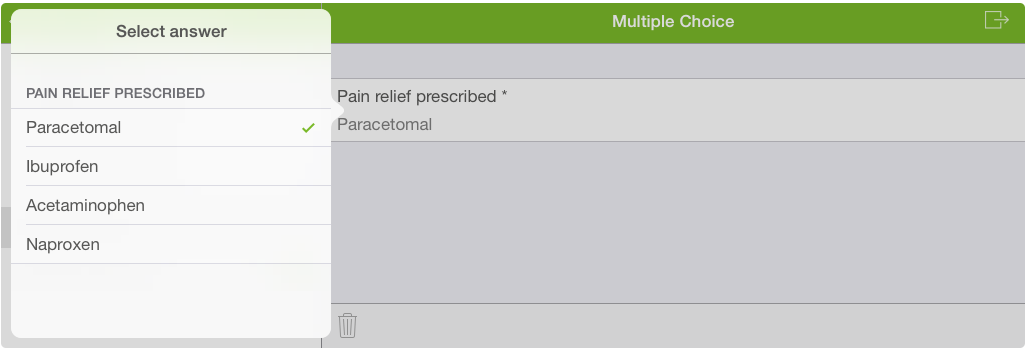
Select the Multiple Choice control within the form.
The Select answer screen appears.
-
Select an option as required.
-
Submit the form.