Capacity Checker
The Capacity Checker allows care providers to respond quickly to new service requests. You can check the capacity for a new client or service user who requires care, enabling you to see if a care plan can be accommodated within the service.
How it Works
When you request a new capacity check, Referral Management (Carelink) creates an ad-hoc instance of the Totalmobile Mendel engine in the background, loading all of the care workers' details and any unavailability from Dynamic Scheduling (Optimise), along with all existing care plans for the date range requested in order to generate a plan. Then Mendel runs again, but this time combines the details of the care plan requested with the previous result and produces a new plan with all visits that can be scheduled from the care plan requested.
For more details, refer to Request a Capacity Check.
Capacity Check Results
When you select Check Capacity, the system provides a summary of the availability for the care plan requested and other KPIs that help to make a decision whether or not to accept the service user into the service.
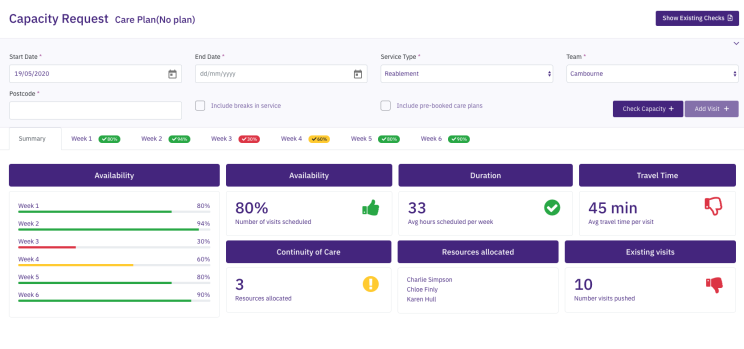
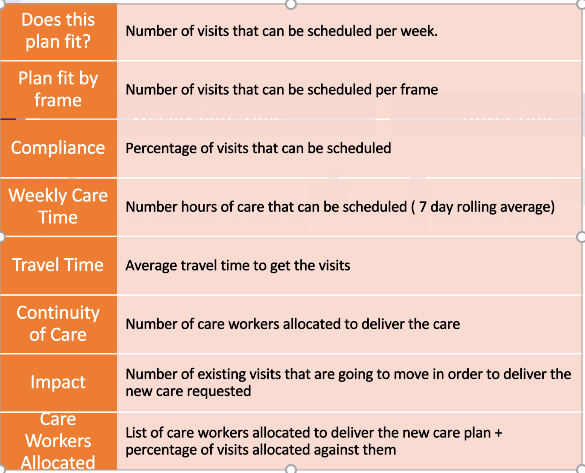
For details of configuring the capacity indicator widgets and thresholds used in the results, refer to Manage Capacity Settings.
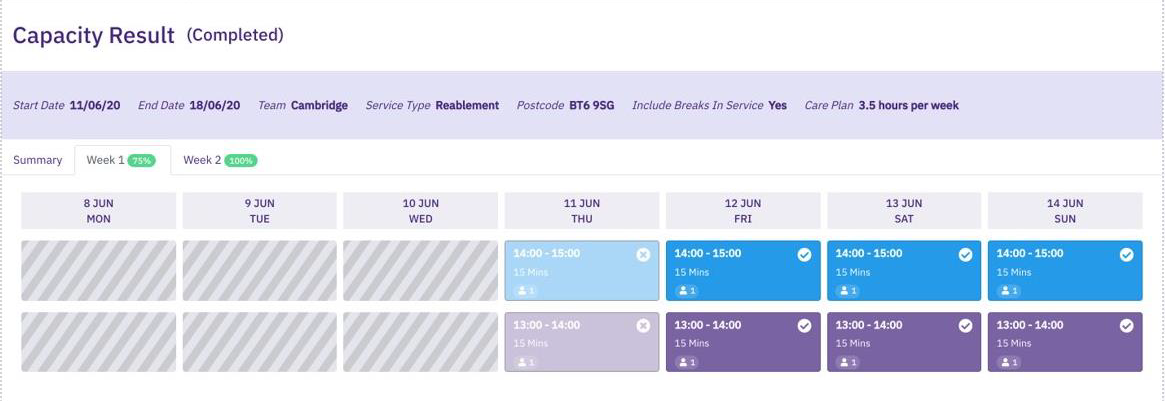
Referral Management also provides week by week visibility of the visits that can be scheduled.