Mobile Working (Mobilise) - Release 9.44 On-Premises
Release Date: November 2026
We have been enhancing Mobile Working On-Premises since the last release, adding new features and addressing known issues to improve quality.
Some features may require additional setup by Totalmobile. If needed, reach out to your Account Manager for access details.
These Release Notes cover the following:
What's New
Mobile Working
-
.NET 10 Support
The On-Premises installation of Mobile Working now supports Microsoft .NET 10.
Android
- Parts Arena Integration
A new integration with Parts Arena has been implemented for the Mobile Working (Mobilise) Android client, and is configured in Web Admin > Forms > Form Elements > Catalogue Controls > Catalogue App.This allows users to access a comprehensive component library and select parts specific to the assets they need to repair. They can also set parameters derived from form values, such as search terms, and Parts Arena parts data can be used to populate form fields. This integration streamlines the part selection process and improves efficiency in field operations.
For more details refer to Catalogue App Control.
- Diary Colours by Status
The Mobile Working diary on Android now supports configurable visit colours based on visit status. Administrators can set a specific colour for each status, while visits without a configured status colour continue to use the existing default colours.
For more details refer to Visits Workflow.
-
Slider Input Control
Android forms now support a new slider control for capturing numeric responses such as goal and sub-goal progress. The slider can be configured with minimum and maximum values, optional step intervals, and labels. Previously saved values can be loaded back into the form for updates.
For more details refer to Slider Control.
-
Mandatory Coded Task Update
Visits on Android now enforce the required coded-task rule when that setting is enabled for a solution. Users cannot complete a visit unless at least one coded task has a quantity greater than zero, and they will see a clear message when completion is blocked.
iOS
-
iOS 26 Compatibility Update
The iOS client now supports the Liquid Glass user interface. As a result there are minor changes in how the app functions. See below for some examples.
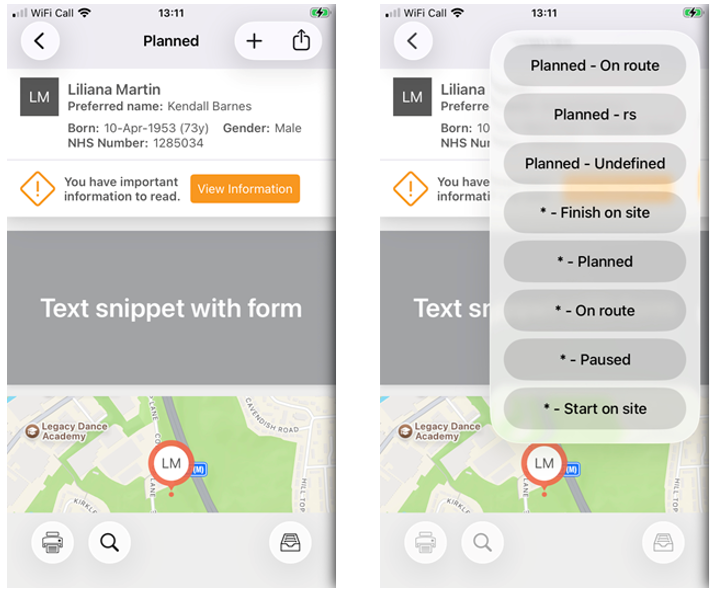
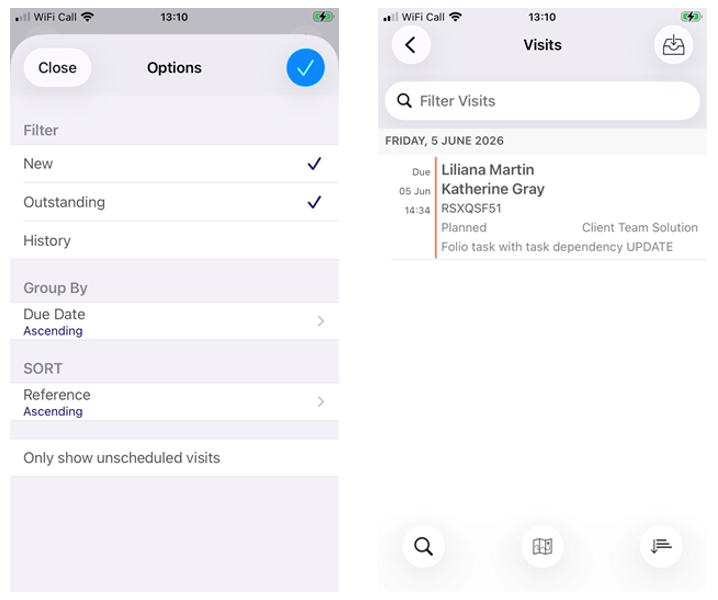
The branding has been removed on the header to align with Liquid Glass design.
Fixes
|
Ref |
Variation |
Description |
|---|---|---|
|
MC-7989 |
Mobile Working |
An issue has been fixed where the Approvals creation screen was displaying an endless spinner. |
|
N/A |
Mobile Working |
A number of security fixes have been made. |
|
MC-8346 |
Android |
Improvements to Google Map view. |