Emergency Services Rostering (GRS) - Release 9
Release Date: November 2025
We have been enhancing Emergency Services Rostering (GRS) since the last release, adding new features and addressing known issues to improve quality.
Some features may require additional setup by Totalmobile. If needed, reach out to your Account Manager for access details.
These Release Notes cover the following:
What’s New
-
MIS Interchange - Title Field
A new Title field has been added to the GRS CAD interface. This enhancement allows call centre staff to better understand the crew mix by displaying staff titles, such as Paramedic, alongside their name, location, skills, and mobile number. This improvement aims to reduce incorrect job dispatches and enhance overall operational efficiency.
For more information refer to MIS Interchange - Add Title Field. -
Organise (GRS) Student / Mentor Module
A new Student / Mentor module has been added. This new module allows for the addition of a third crew member, specifically designed to support student mentoring programs within the organisation.
For more information refer to Student/Mentor Module. -
Email Character Limit Extended
The email character limit has been extended beyond the previous 50-character restriction. This update allows for longer, more detailed email addresses to be used within the system, accommodating a wider range of email formats and improving user flexibility. -
Chronicle Integration
A new Chronicle integration has been added. This integration enhances the system's capabilities by connecting it with the Chronicle platform, enabling seamless data exchange and improved workflow management across both systems. -
Absences Integration
A new Absences integration has been added. This integration enables automatic synchronisation of absence data between the Organise (GRS+ system), Totalmobile's integration service, and 3rd party systems, streamlining absence management processes and improving data accuracy across platforms. -
Components Upgrade (Phase 1)
Phase 1 of upgrading components to address high vulnerabilities has been completed. This update enhances the overall security of the system by addressing and mitigating identified high-risk vulnerabilities in various components. -
Data Retention Periods Feature Set (Phase 1)
Phase 1 of Data Retention Periods Feature Set has been implemented. This update introduces new data retention capabilities, allowing for more efficient management and storage of historical data within the system. -
Performance Improvements
Performance Improvements have been implemented. These enhancements focus on optimizing various aspects of the application to support faster response times and improve overall user experience within the cloud environment.
Fixes
|
Ref |
Description |
|---|---|
|
GRSSUP-22 / GRSSUP-145 |
Unsocial Hours & Absence - Equal Amounts / Unsocial Hours - Deduct Ref Break From Social Absences First A new system option has been implemented under the Time Sheets category called ‘Unsocial Hours - Section 2A - Portion Ref Breaks between Worked Hours and Non-Unsocial Absence Hours'. This option only applies to staff who have the Unsocial Calculation Type of ‘AFC Section 2a (Ambulance)’ configured for their Contract in the Personnel Records screen. This system option determines the outcome of ref break deductions for Unsocial Hours on days when a Part Day Absence is present, which is excluded from the Unsocial Hours calculations (i.e. ‘Include in Unsocial’ option is set to 'No’ for the Absence Definition, as configured in Absences > Absence Definitions > Absences). When set to Yes:
When set to No: (this is the default setting on upgrade)
|
|
GRSSUP-51 |
Roster Definitions - Posts - New Posts Not Showing Available For Future Locations A date picker has been added to the Organisation Structure in the Post screen (Rosters > Roster Definitions > Posts) for locations added for a future date. |
|
GRSSUP-576 |
Shift Swap Incentive Analysis - Planned Overtime Claim Planned OT should only show on the report, Overtime > Overtime Reports > Shift Incentive Analysis if the person is still in the overtime column on DPS for the shift. |
|
GRSSUP-760 |
API - Previous Service Data Duplicates A fix has been implemented to add reckonable service to a person multiple times and ensures that the same record is not / cannot be repeatedly added. |
|
GRSSUP-946 |
Scotland Unsocial Hours Calculation - Single Time Overtime A change has been implemented for the Unsocial Calculation Type: ‘Scotland Rostered’. Previously, people with this Unsocial Calculation Type could only qualify for Unsocial Hours when working either a Standard Shift or Overtime Shift (at ‘Single Time' rate only) over a Bank Holiday. This behaviour has now been changed so that Overtime (at 'Single Time' rate only) can now qualify for Unsocial Hours when worked over any day, regardless if the day is a Bank Holiday. Standard shifts will remain to qualify for Unsocial Hours when worked over a Bank Holiday only (as per original behaviour). Unsocial Period for Standard Shifts:
Unsocial Period for Overtime Shifts ('Single Time' Rate only):
|
|
GRSSUP-1032 |
Sickness Analysis - Count Work Others In Days/Hours Lost Figures - Configurable Reporting Option An enhancement has been introduced to provide greater flexibility in sickness analysis reporting. A new configuration option is available to control how duty information is included within reported totals, allowing organisations to tailor reporting outputs to their specific requirements. This update does not change existing functionality by default, ensuring continuity while enabling more flexible reporting where needed. |
|
GRSSUP-1107 |
Roster Planners - Shift Advance Planner - Skills A change has been made so that the any Personnel Skills that are set to show in the Person Picklist are now visible on the Shift Advance Planner. |
|
GRSSUP-1129 |
Timesheet - Protected Section 2a Not Calculating Upper Rate A change has been made so that when a Protected unsocial shift goes over a Sunday it now shows in the upper rate unsocial column. |
|
GRSSUP-1175 |
Unsocial Hours - Unsocial Hours - Protected (section 2a) - Error Message - Stack Trace A change has been made so that when protected unsocial hours are added and saved (Unsocial Hours > Unsocial Hours - Protected (Section 2a)) now saves successfully. |
|
GRSSUP-1279 |
Rosters - Unit Shift Pattern - Error With Missing Table A change has been made so that when a Unit Shift Pattern on a location is changed it now saves successfully. |
|
GRSSUP-1291 |
Rolling Relief - Generic Process Doesn't Extend Past Initial Periods When the System Option (Tools > System Options - Personnel) Rolling Relief - Auto Calculation is set to Yes the Rolling Relief periods are now extending past the initial periods. |
|
GRSSUP-1304 |
Time Owing - System Security - Allowing Data For Full Organisation When Set To Only 1 Location A change has been made to the permissions so that if a person has access to the TOIL screen and multiple ranges, they can no longer see TOIL records for people outside of the ranges that have access to the Time Owing screen. |
|
GRSSUP-1306 |
Time Sheet Reports - Time Sheet Summary - Overtime Display Correction An issue has been resolved to improve the accuracy of overtime reporting for Actual Overtime claims when linking it to a Planned Overtime Shift on the Posting Sheet. Previously, under certain conditions, overtime entries could be displayed incorrectly when linked to planned work, due to inconsistencies in how related data was associated. This has now been corrected to ensure overtime entries are accurately aligned with their corresponding planned records, resulting in correct reporting outputs. |
|
GRSSUP-1327 |
Control Room Sheet - Pair by Call Sign/Crew A change has been made to Control Room Sheets when the layout has been set to Pair People By Crew or Call Sign, people are now showing. Previously, when certain grouping layouts were applied, individuals could fail to appear in the report under specific conditions. This has now been corrected to ensure personnel are displayed accurately based on the selected grouping configuration. |
|
GRSSUP-1379 |
Annual Leave Workflow - Established Post End Date This fix ensures the established locations which are end dated are kept open for permanent employees on the workflow so as not to affect their allowances. |
|
GRSSUP-1412 |
New Training Module - Student Pre-Booking - Long Loading Time A change has been made to improve the load time of the Student Pre-Booking screen in the New Training Module (New Training Module > Training Management > Student Pre-Booking) and when booking Pre-Booking students onto an instance of a course (New Training Module > Training Management > Course Setup). |
|
GRSSUP-1442 |
Message Board - Pressing Enter/Pressing Shift Enter Sends Message Instead Of Inserting New Line When pressing the Enter button during the Send Message Wizard, the Wizard no longer moves to the next page and allows you to enter multi line messages. |
|
GRSSUP-1448 |
Time Sheet Reports - Time Sheet Submission - Data Breach Error A change has been made to System Security for Time Sheets > Time Sheet Reports > Time Sheet Submission. Only people who have a primary location at the range which has access to this screen will be returned. |
|
GRSSUP-1455 |
Set Up Rosters - Layout Changes - RRD Removed By Adding New Line A change has been made to check if a person is not posted and abstracted on a working absence, that the DRD remains if the underlying rostered posting is a rest day. |
|
GRSSUP-1457 |
Annual Leave Workflow - Final Balance Annual Leave - Calculate Final Balance is now working correctly when shapes - Move to Next Established Location, Has Established Location and Move to Next Date and Check Valid. When the Last Working Day is entered the pro rata entitlement is showing correctly. |
|
GRSSUP-1459 |
Control Room Sheets - Preferred Name Is Not Showing A change have been made so that when the Use Preferred Name System Option is set to Yes the Preferred Name is displayed on the Control Room Sheet Record. There needs to be a Control Room Sheet Layout set up - Timesheets > Control Rooms Sheets > Control Room Sheet Layout with the Person Display Option set to include First Name on the Layout Settings Tab. The System Options need to be set - Tools > System Options - Personnel - Sort Pick List by (needs to include first name) and Use Preferred Name When Available. People need to have a Preferred name recorded on their personnel record - Personnel > Personnel Management > Personnel record. |
|
GRSSUP-1482 |
Individual Duties - --- Shift When Abstracted On Overtime From Unit Shift Pattern Location using a Unit Shift Pattern. A change has been made so that when a person is on overtime then abstracted, the Rostered shift is now showing as the underlying shift on Individual Duties. |
|
GRSSUP-1507 |
Annual Leave Overview - Failing When Location Has No Annual Leave Allocations A change has been made so that when Annual Leave > Annual Leave Reports > Annual Leave Overview, and a location is selected which has no annual leave allocations the report will load. |
|
GRSSUP-1523 |
Rolling Relief Screen - New Starters Not Visible A change has been made so when a future new starter has been added into Personnel Management > Personnel record, and the contract assigned has ‘Needs Worked Hours Balance’ is set to Yes, they will show in Personnel > Personnel Rolling Relief > Rolling Relief screen. |
|
GRSSUP-1567 |
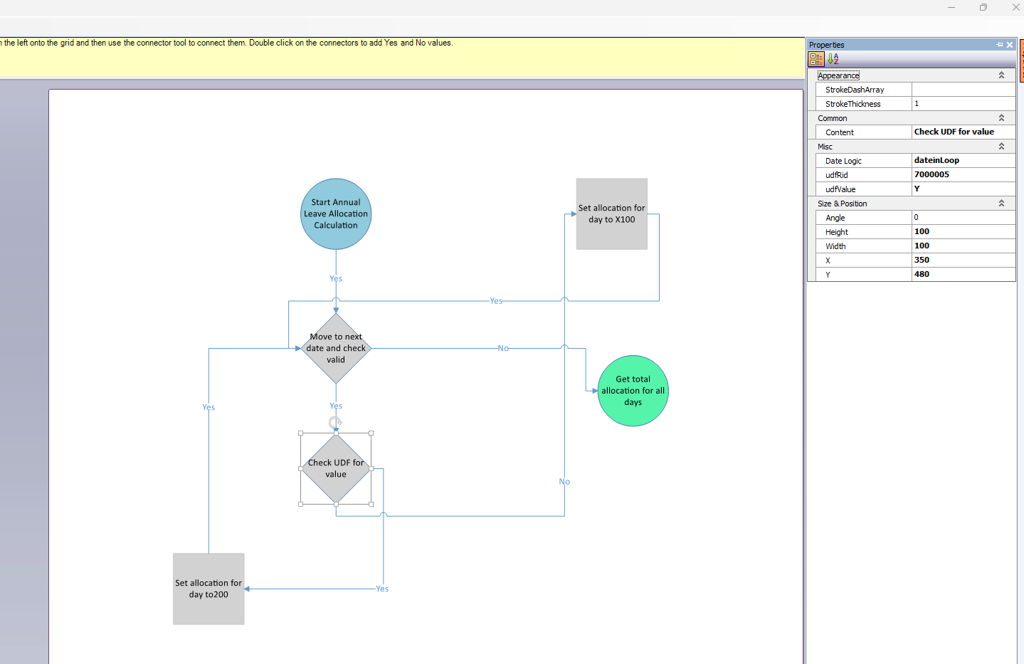
Annual Leave Workflow - UDF Date Tracking A new property has been added to the workflow shape - Check UDF for Value - date logic. A date in loop in the Date logic has been introduced, so if this shape is used in a loop and is set to date in loop it will check every date for a UDF Value.
|
|
GRSSUP-1600 |
Sickness Record - Skill Expiry Check - Temp Table Issue A change has been made so more than one operator can save sickness at the same time without causing an error. |
|
GRSSUP-1624 |
Timesheets - Overnights Not Creating Correct Number Of Clockings A changed has been made to the Time Sheet records so that the correct number of clocking's are displayed when the overnights are run. |
|
GTD-288 |
Posting Layout Fix The Posting Sheet Layout saves correctly and within seconds, after editing the Posting Layout, adding a new row, or inserting numerous posts and shift patterns. |
|
ORG-8961 |
Sickness Records - Very Slow Adding A Record The Sickness Record is now saving and screen refreshing immediately. |
|
ORG-9440 |
Unsocial Hours - Should Only Include TOIL Not Paid OT (LAS) Section 2a Unsocial Hours - A new check box field has been added to the Overtime Rates and Rules screen called ‘Include in Unsocial Hours (Section 2a)’. Previously, for staff who have the Unsocial Calculation Type of ‘AFC Section 2a (Ambulance)’ associated with their Contract on their Personnel Record, any Planned/Incidental Overtime assigned a Rate with a Multiplier of '1' (i.e. Single Time) would be included in the Unsocial Hours calculations. Any Planned/Incidental Overtime assigned a Rate with any other Multiplier (i.e. Time and Half / Double Time) would be excluded from the Unsocial Hours calculations. This behaviour has now been changed to acknowledge the new check box option on the Overtime Rate instead:
When adding a new Overtime Rate, the new check box setting will be unticked by default. Selecting the Multiplier of '1' will auto tick the check box, but can then be unticked if required. Selecting any other Multiplier will auto untick the check box, but can then be ticked if required. The check box setting can be changed at any time. To maintain the previous behaviour, the check box will be ticked for any existing Overtime Rates that have a Denominator of ‘1' and a Numerator of ‘1’, which is the equivalent of a Multiplier of '1’ (e.g. Single Time). For all other Overtime Rates (e.g. Time & Half or Double Time), the check box will be unticked. |
|
ORG-9441 |
Staff Management Report - Permission Issue When a member of staff only has access to a small security range that includes the Staff Management report, they can only view personnel from that range in the report. |
|
ORG-9987 |
Absence Definitions - Long Term/ Short Term Sickness Both Not Defined Absence definitions were not showing in the Absence Embargoes screen when there was no definition for Long Term / Short Term sickness absence types. |
|
ORG-10005 |
Daily Posting Sheets - Error: Object Reference ... - When Remarks Added On A Blank Posting The Public and Private remarks on the DPS now save correctly. |
|
ORG-10021 |
Absence Records - Sorting Absences Headers Causes Error (GC) Users can click on the Absence Headers without error occurring, however no sort functionality has been built in this fix. |
|
ORG-10379 |
Student / Mentor Assignment - Multi Location Worker Excluded Locations (Regression) Implemented the use of the contract/location exclusion tables to manage multi-location workers when assigning and updating student postings under the new Student / Mentor Configuration rules. TM need to populate database tables with contracts/locations to be excluded. When in use, the assignment report only shows the non-excluded shifts for a mentor and the student will be assigned only to those shifts. Subsequently, only changes to the non-excluded shift will affect the student. If the tables are not used, a multi-location mentor assignment will result in all mentor shifts being given to the student. In this scenario, on Individual Duties, the student shifts will show against the mentor’s primary location, although if the system is configured to move the student, their actual postings will be on each of the relevant locations (given a post of the configured post type is available). Subsequent updates to those shifts will result in the student having the last updated shift/location or potentially being removed from the assignment if the edit is to a shift on a location without a student post. We recommend use of the exclusion tables to manage multi-location Mentors. |