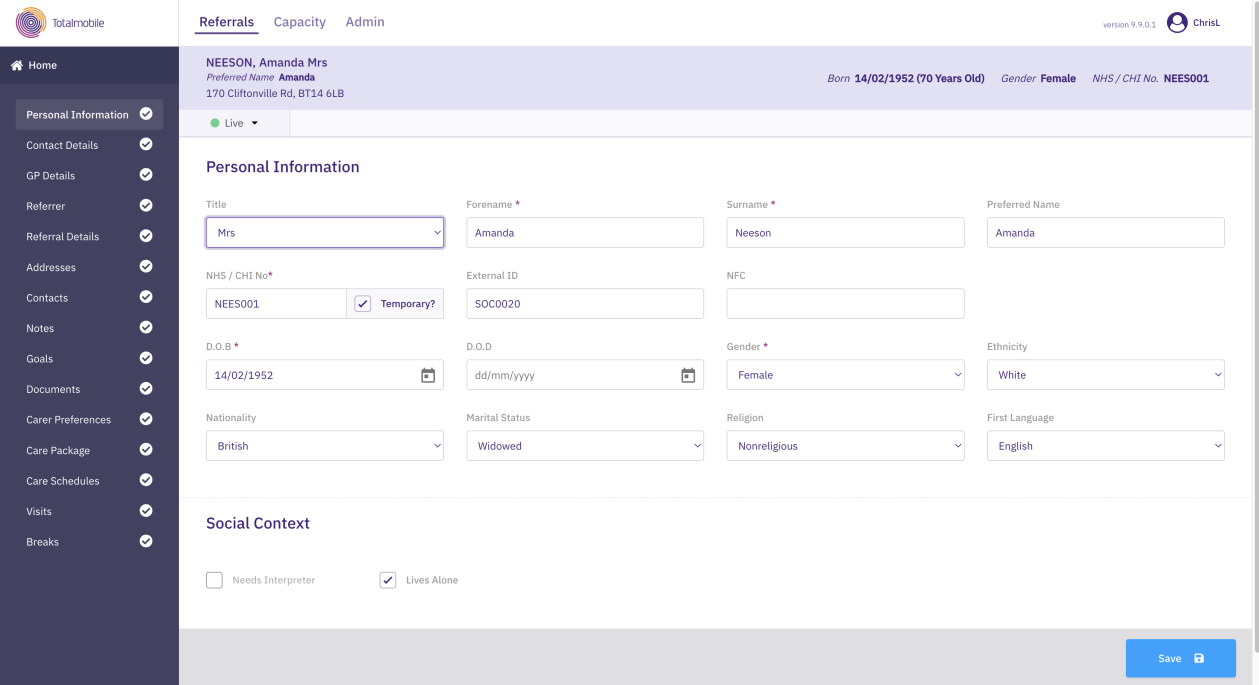
Update Personal Information
To update a service user's personal information:
-
On the Referrals tab, select a referral for the required service user.
-
In the Referral Summary panel, select Edit.
-
On the referral's navigation menu, select Personal Information.
-
Enter or update the following:
- Title
-
Forename*
-
Surname*
-
Preferred Name
-
NHS / CHI Number* – select the Temporary checkbox if the number is temporary
For referrals based outside the UK, the Service User ID is used instead of an NHS or CHI Number. For more details refer to Manage Service User Settings.
-
External ID - a service user ID within a third-party system
-
NFC – Near Field Communication Number, stored in the service user’s home
-
Date of Birth*
-
Date of Death
-
Gender*
-
Ethnicity, Nationality, Marital Status, Religion, First Language
-
Social Context - select the checkboxes if the service user requires an interpreter or lives alone. This information appears as part of the special instructions in Mobile Working (Mobilise).
-
Select Save.
* Required field.