Apply Filters
To apply filters:
-
In WebAdmin, select Optimise Schedule.
The Worlds page appears.
-
Select a World.

The Optimise Schedule page appears.
-
Select Show Filters
 .
-
In the Filters panel, select an Attribute.
The Allocated To and Skill attributes are always available in the Filters panel. The other attributes available depend on what has been configured for the World. For more details refer to Attribute Filtering in the Administrator Guide.
The Attribute values display.
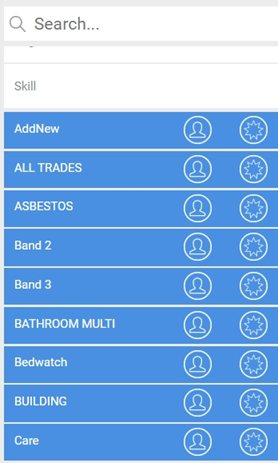
Use the Search field to filter the list of attributes.
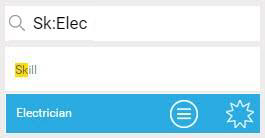
You can also search for the Attribute and Value simultaneously in one search. This is useful for attributes that have a large number of different values. Enter your search in the format partial/full attribute name:partial/full value name - for example Sk:Elec for Skill and Electrician. Your search criteria are highlighted in yellow and the value is also displayed.
The Allocated To attribute allows you to filter resources.
-
To apply an attribute value filter to resources, select Activate/Deactivate Filter for Resources for that value.
The Resource List updates to include only resources that have the applied attribute value, for example Care.

-
To apply an attribute value filter to jobs, select Activate Filter for Jobs for that value.
The Job List updates to include only jobs that have the applied attribute value, for example Care.
-
Repeat steps 4-6 for as many filters as you require.