Banding Groups
Banding groups are a scheduling constraint used by Mendel to control which resources can be allocated to which jobs. You can assign a banding group to both jobs and resources, and each group is given a weighting per World. A resource can only be scheduled to a job if its banding group weighting is equal to or higher than the job's banding group weighting.
For example, you have four banding groups for nurses:
-
Band 1 (Weighting 100)
-
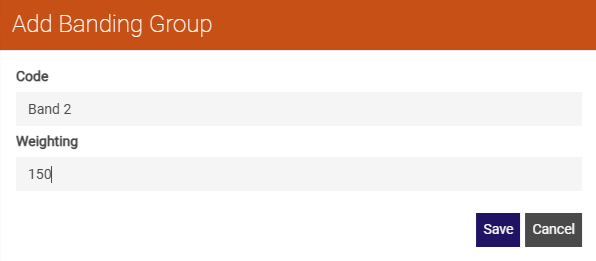
Band 2 (Weighting 150)
-
Band 3 (Weighting 200)
A job assigned to Band 1 can be allocated a resource from any of the three bands. However, a job assigned to Band 2 can only be allocated to a resource in Band 2 or Band 3.
To use banding groups in a World, you must enable the Banding Group constraint in Mendel Settings.
You must also set a Banding Group Cost Calculator value in Mendel. For more details refer to the Mendel User Guide.
You need the Banding Groups permission to access this feature. For more details refer to Permissions.
-
In WebAdmin select Optimise Admin.
The Optimise Admin page appears.
-
Select a World.
The World Settings and Permissions page appears.
-
In the Settings section, select Banding Groups.
The Banding Groups page appears.
-
Select Add New Banding Group
 .
. -
Select the Code field and enter a banding group code.
-
Select the Weighting field and enter a weighting for the banding group.
-
Select Save.