Import World Settings
You need the Optimise World Import permission to access this feature. For more details refer to Permissions.
You can import settings exported from one Optimise World into another World, either in the same tenant or a different one, removing the need to re-create those settings separately. For more details on exporting a World's settings, refer to Export World Settings.
To import World settings:
-
In WebAdmin select Optimise Admin.
The Universal Settings and Worlds page appears.
-
In the Worlds section, select a World.

The World Settings and Permissions page appears.
-
In the Settings section, select Optimise World Import.
The World Import dialog appears.
-
Select Select file to import
 , then browse to and select the import file.
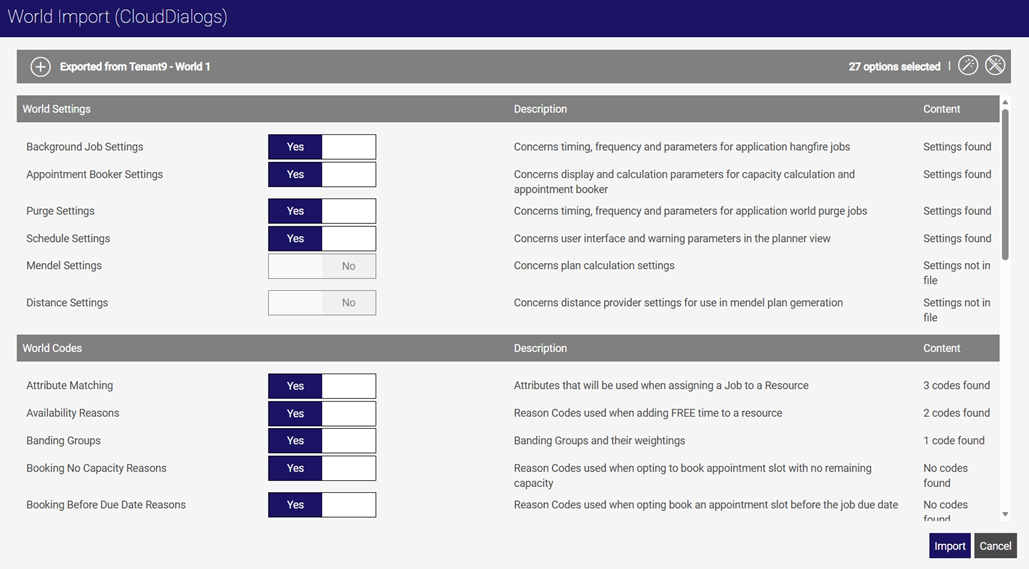
The World Import dialog updates, with all the settings found in the file toggled to Yes. The Content column contains details of the content for each setting.
-
Adjust the import settings if required by selecting the toggles.
-
To toggle all settings to No, select Unselect All
 .
. -
To toggle all available settings to Yes, select Select All
 .
.
-
-
Select Import.
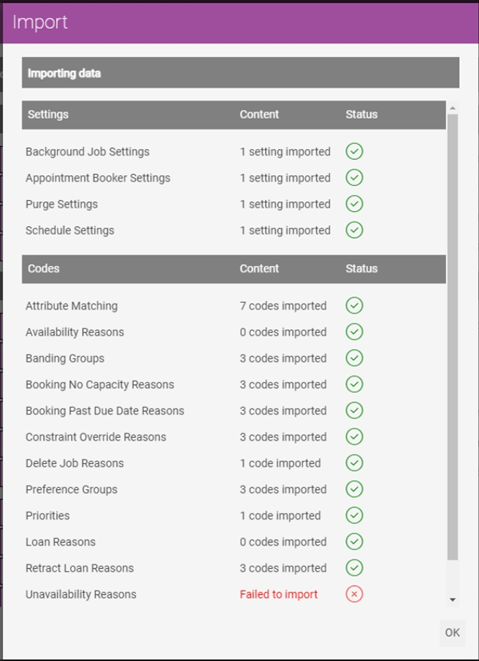
The Import dialog appears, displaying the import progress. If any items fail to import, an error message is displayed next to that item. This does not effect the overall import process.
-
Select OK.