Prohibited Resource
You can prohibit resources from being scheduled to specific jobs in Optimise Schedule. For example, a health visit requires a resource without an animal allergy. You specify the resources you want to prohibit in the CreateJobRequest message and Mendel treats this as an absolute constraint.
Prerequisites for Scheduling Jobs with Prohibited Resources
-
An Enterprise or Cloud World. Prohibited resources are not a feature in Essential Worlds.
-
You must enable the Prohibited Resource constraint in Mendel settings. For more details refer to the Mendel User Guide.
-
Jobs with resources specified within the Prohibited Resource tag in CreateJobRequest messages. For more details refer to the Integration SDK.
When you send a job into an Optimise Schedule World with prohibited resources, for example all resources with an animal allergy, the Job Details dialog shows which resources are prohibited.
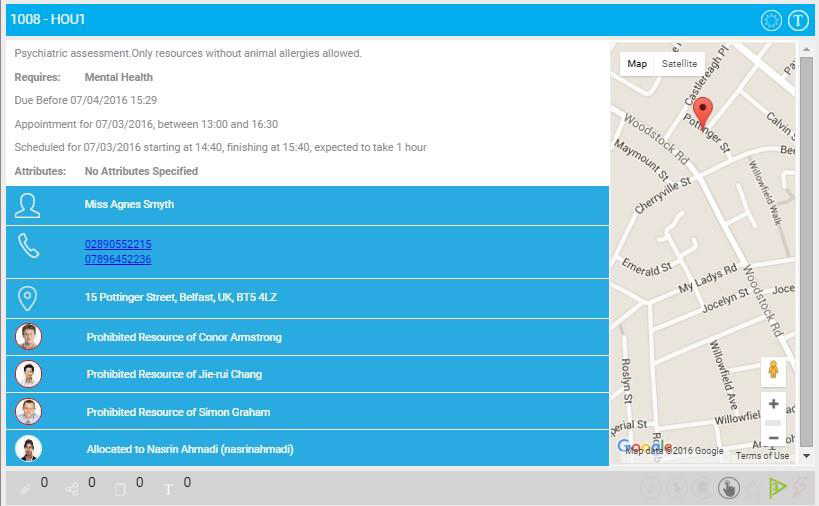
You can also add or edit prohibited resources on the Job Details dialog. For more details refer to Add Resources.
You cannot pin or commit jobs to prohibited resources.
You can schedule jobs to prohibited resources with an appropriate reason code if you have the Schedule Jobs to Prohibited Resources in Optimise permission for the World. For details of assigning permissions, refer to Permissions in the Administrator Guide.