Time Sheet Claim Authorisation
The Time Sheet Claim Authorisation page enables a user with authorisation privileges to run a report and review Overtime and Acting Up claims from their time sheet based on status, including the reason and whether an overtime claim is for planned and casual overtime.
Overview of Overtime and Acting Up tabs
The Time Sheet Claim Authorisation page provides detailed information from a user's claims on two tabs:
-
Overtime
-
Acting Up
Each tab displays a number in brackets to indicate the number of pending claims, such as Overtime (1).
These cover the following types of claim:
-
Overtime Claim
-
Overtime Claim with Acting Up hours/shifts — available only for time sheets that an administrator has configured with Islands of Duty (Time Sheet Style) with Enter Overtime Claims and Enter Acting Up on Overtime in Main Client
-
Acting Up hours/shifts claim that are in addition to standard duties on a Time Sheet — available only for time sheets that an administrator has configured with Islands of Duty (Time Sheet Style) with Enter Overtime Claims and Enter Acting Up on Claims in Main Client
To review the claims, select a tab to load the claims in a table.
Filtering Claims by Status
To filter Overtime or Acting Up claims by status, select the drop-down menu next to Claim Status and select one of the following items:
-
Pending — displays all pending claims, with the option to Authorise or Reject each claim as appropriate
-
Authorised — displays all authorised claims
-
Rejected — displays all rejected claims
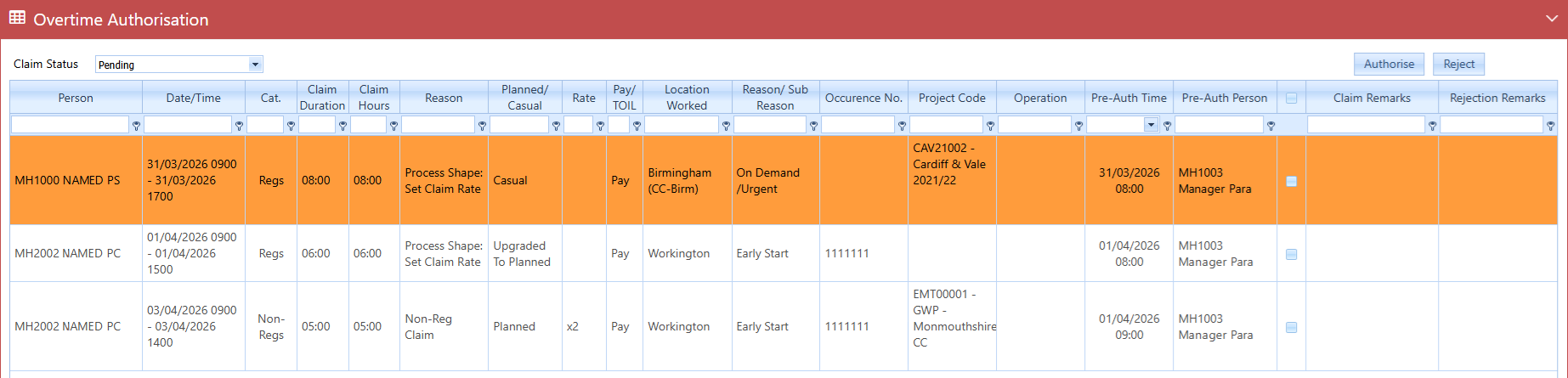
The following example is for Overtime claims with the Pending status and does not apply any of the filters:
Authorising or Rejecting a Claim
The table displays any claims that are yet to be reviewed and authorised or rejected with a Status of Pending.
To review and authorise or reject a claim:
-
Select the row for the claim in the grid so that it is highlighted. You can select multiple claims by selecting the check box for each claim.
-
Review the claim, noting any remarks that the user has recorded.
-
Select the appropriate button, either Authorise or Reject. A message appears to confirm you are authorising or rejecting the selected claim(s).
-
The status of the selected claims updates to either Authorised or Rejected as appropriate.
Overtime tab - Claim Table Column Names and Descriptions:
You can scroll through the table to view additional information more easily. The columns for [+/-], Person, Date/Time, Cat., Claim Duration, and Claim Hours remain fixed and visible while navigating other columns.
-
[+/-] — allows you to expand or collapse a claim header row to view the child claims contained within it.
-
Person — the person that the overtime claim is for.
-
Date/Time — the start date and time, and end date and time of the overtime period.
-
Cat. — the category associated with the overtime claim. The Main Client offers the ability to configure the available Category options available on the Overtime Claim form according to the requirements of the organisation.
-
Claim Duration — the total time of the overtime period.
-
Claim Hours — the number of hours of overtime being claimed (not including any multiplier).
-
Reason — the reason for the overtime that a person has selected on their overtime claim form. The Main Client offers the ability to configure the available Reason options available on the Overtime Claim form according to the requirements of the organisation.
-
Planned/Casual — displays the status of each claim using one of the following values: Planned, Casual, Upgraded to Planned. If a claim does not have a status of Planned or Casual, the column remains blank.
-
Rate — the rate applied when the user submitted the overtime claim. It displays values for Non-Regulation and Regulation. Where multiple rates apply but it is not possible to display all, it displays the highest applicable rate. For information, refer to Overtime tab - Rate Information and Overtime tab - Rate Field.
-
Pay/TOIL — whether the claim is for receiving compensation for the overtime as Pay or TOIL.
-
Location Worked — the location of the overtime work that the overtime claim relates to.
-
Reason/Sub Reason — the sub-reason for the overtime that a person has selected on their overtime claim form. The Sub Reason field is empty if it is neither present or a mandatory selection for the Reason on the form. The Main Client offers the ability to configure the available Reason and Sub Reason options available on the Overtime Claim form according to the requirements of the organisation.
-
Occurrence No. — number of occurrences.
-
Project Code — the project code associated with the overtime claim. The Main Client offers the ability to configure the Project Code options associated with an overtime claim according to the requirements of the organisation. It is possible for a supervisor to add or update a Project Code; refer to Mandatory Project Code Field.
-
Operation — the Operation Overtime Code, which is associated with an Overtime Operation definition. It has specific attributes associated with an Overtime Reason; for example, a Location and Overtime Authoriser. The Main Client offers the ability to configure the definitions according to the requirements of the organisation.
-
Acting Up Grade — the Grade that the user selected on their claim form, which is above their current grade within the person's class on the base date.
-
Pre-Auth Time — time of the pre-authorisation.
-
Pre-Auth Person — person associated with the pre-authorisation.
-
Claim Remarks — any remarks that the person making the claim has added on the form.
-
(check box) — a check box to select the row on the form, allows multiple selections, for Approve and Reject actions.
-
Rejection Remarks — any remarks that the person who rejected the claim has added. The field can only contains remarks if the claim status is Rejected.

Acting Up tab - Claim Table Column Names and Descriptions:
The Acting Up claim grid contains the following columns. You can scroll through the table to view additional information more easily. Some columns, such as those for [+/-], Person and Date/Time, remain fixed and visible while navigating other columns.
-
[+/-] — allows you to expand or collapse a claim header row to view the child claims contained within it.
-
Person — the person that the Acting Up claim is for.
-
Date/Time — the start date and time, and end date and time of the Acting Up period.
-
Claim Hours — the number of hours of Acting Up being claimed (not including any multiplier).
-
Reason — the reason for the Acting Up that a person has selected on their claim form. The Main Client offers the ability to configure the available Reason definitions that are available on the form.
-
Grade — the Grade that the user selected when submitting the Acting Up claim form, which is above their current grade within the person's class on the base date.
-
Location Worked — the location of the overtime work that the overtime claim relates to.
-
Pre-Auth Time — time of the pre-authorisation.
-
Pre-Auth Person — person associated with the pre-authorisation.
-
Claim Remarks — any remarks that the person making the claim has added on the form.
-
(check box) — a check box to select the row on the form, allows multiple selections, for Approve and Reject actions.
-
Rejection Remarks — any remarks that the person who rejected the claim has added. The field can only contains remarks if the claim status is Rejected.
Overtime tab - Rate Information
The Rate column has an expansion feature that enables you to view more detailed information about individual claims linked to a single claim header record.
To view more information about the pay rate:
-
In the Rate column, select the [+] plus icon in the first column to expand the claim header row.
-
This reveals a child table that lists all claims that are associated with that record. This table provides the following details:
-
Start Time — start date and time of the claim
-
End Time — end date and time of the claim
-
Claim Duration — total time between the Start Time and End Time of the claim
-
Claim Hours — number of hours allocated to the claim (not including any multiplier), including any adjustments such as ref break deductions
-
Rate — rate applied to the claim
-
Reward Type — type of overtime, such as Pay or TOIL
-
-
To collapse the row and hide the child table, select the [-] icon.
Overtime tab - Rate Field
The Rate column displays values for Non-Regulation and Regulation. These headers always contain a single associated claim and therefore show the rate of the individual claim against the claim header row.
For any claim headers that have zero or multiple associated claims below it, the Rate column remains empty.