Alert Call Report
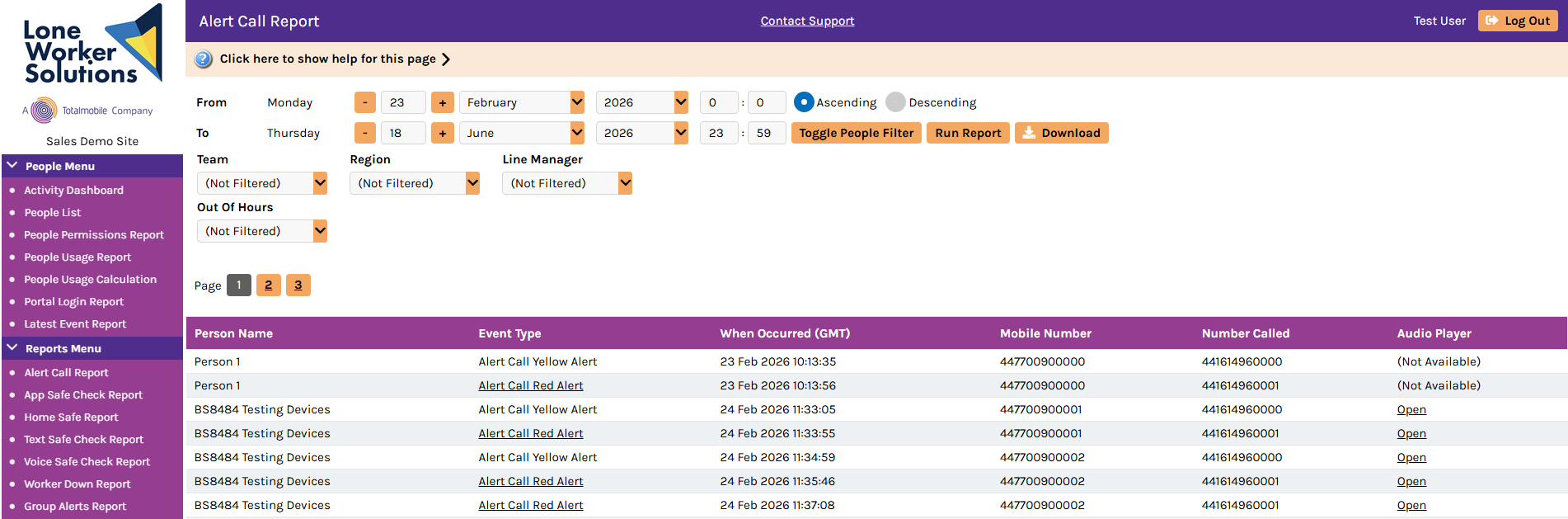
The Alert Call Report provides an immediate summary of outbound Yellow Alerts and Red Alerts by the specified date range and other filter options.
You can access it by selecting Alert Call Report in the Reports Menu or from the Alert Call Module menu in the navigation menu.
To view Alert Call data, select the dates and any fields that you want to filter the report data on, and then select Run Report.
It provides the following filter options:
-
From and To date range — run the report between different dates
-
Toggle People Filter — select and choose individual people to report on
-
Hierarchy categories — the available filter options may depend on the particular configuration for your organisation; an example is grouping people by office or region
The report lists who has made a Yellow Alert Call or Red Alert Call based on the selected date range and filters. It provides the option to hear the call to users with the appropriate permission, by selecting the Open link in the Audio Player column.
The report provides the following data:
-
Name — the name of the person who the Alert Call event concerns
-
Event Type — the type of alert that the person logged, as either:
-
Alert Call Yellow Alert
-
Alert Call Red Alert
-
-
When Occurred (GMT) — the time and date that the event occurred
-
Mobile Number — the mobile number of the person who is linked to the Alert Call event
-
Number Called — the telephone number of the outbound call
-
Audio Player — if an audio recording is available then a user with the permission to listen recordings can select Open to access it