GPS Data Report
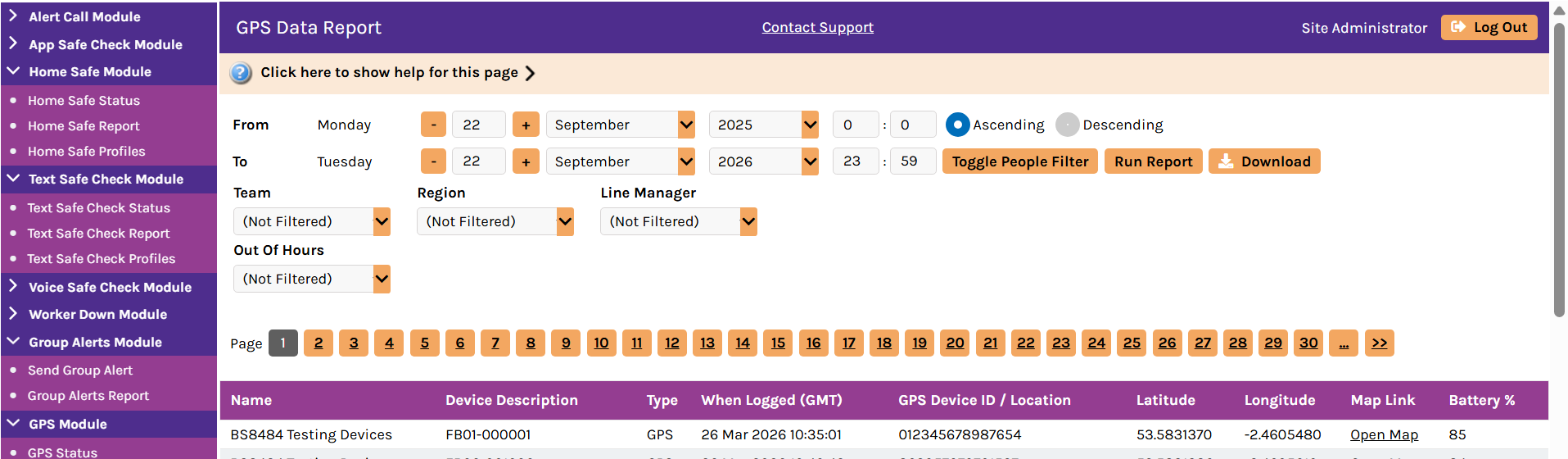
The GPS Data Report shows GPS location data received and the SMS configuration messages sent and received to GPS devices. Running the report returns data according to the selected criteria, such as the specified date range and other filter options.
You can access it by selecting GPS Data Report from the GPS Module menu in the navigation menu.
To view GPS Data Report, select the dates and any fields that you want to filter the report data on, and then select Run Report.
It provides the following filter options:
-
From and To date range — run the report between different dates
-
Toggle People Filter — select and choose individual people to report on
-
Hierarchy categories — the available filter options may depend on the particular configuration for your organisation; an example is grouping people by office or region
The report provides the following data:
-
Name — the name of the person (lone worker) or device that the GPS data concerns
-
Device Description — the description of the device that the GPS data concerns; for example, a device model name or (GPS on Mobile Phone) for the Safe Hub app
-
Type — the GPS type that the GPS data concern, such as:
-
GPS — where the system uses GPS data that the device recorded to calculate the location of the device
-
WPS — where the system uses wireless (Wi-Fi) access point data that the device recorded to calculate the location of the device
For location detection using wireless access point data, Totalmobile enables this feature on a per-site basis. Contact your Account Manager for further information or to discuss enabling this feature for your solution.
-
-
When Logged (GMT) — the time and date (GMT) that the system logged the location
-
GPS Device ID / Location — the GPS device ID or location of the device (if known to the system based on the coordinates); this column may be empty
-
Latitude — the latitude coordinate recorded for the device
-
Longitude — the longitude coordinate recorded for the device
-
Map Link — a hyperlink that a user can click to view the location of the device according to the latitude and longitude coordinates
-
Battery % — the recorded battery level of the device