Configure an Integration Instance
In each integration instance, you can configure the following:
-
Subscriber queues. For more details refer to Add Subscriber Queues.
-
Publisher queues. For more details refer to Add Publisher Queues.
-
Adapters for queues. For more details refer to Manage Adapters.
-
Global settings. For more details refer to Manage Global Settings.
You can also edit and export the Integration Configuration XML to other integration instances. For more details refer to Edit and Export the Integration Configuration XML.
When you save an integration instance, it creates a new version. This enables you to save different versions of your integration configuration before publishing, or revert back to old versions. For more details refer to Save, Publish and Cancel Changes to an Integration Instance.
Access an Integration Instance
-
In WebAdmin select Integration.
-
Under Integration Instances, select an instance.
Use the Search field to filter the list of instances.

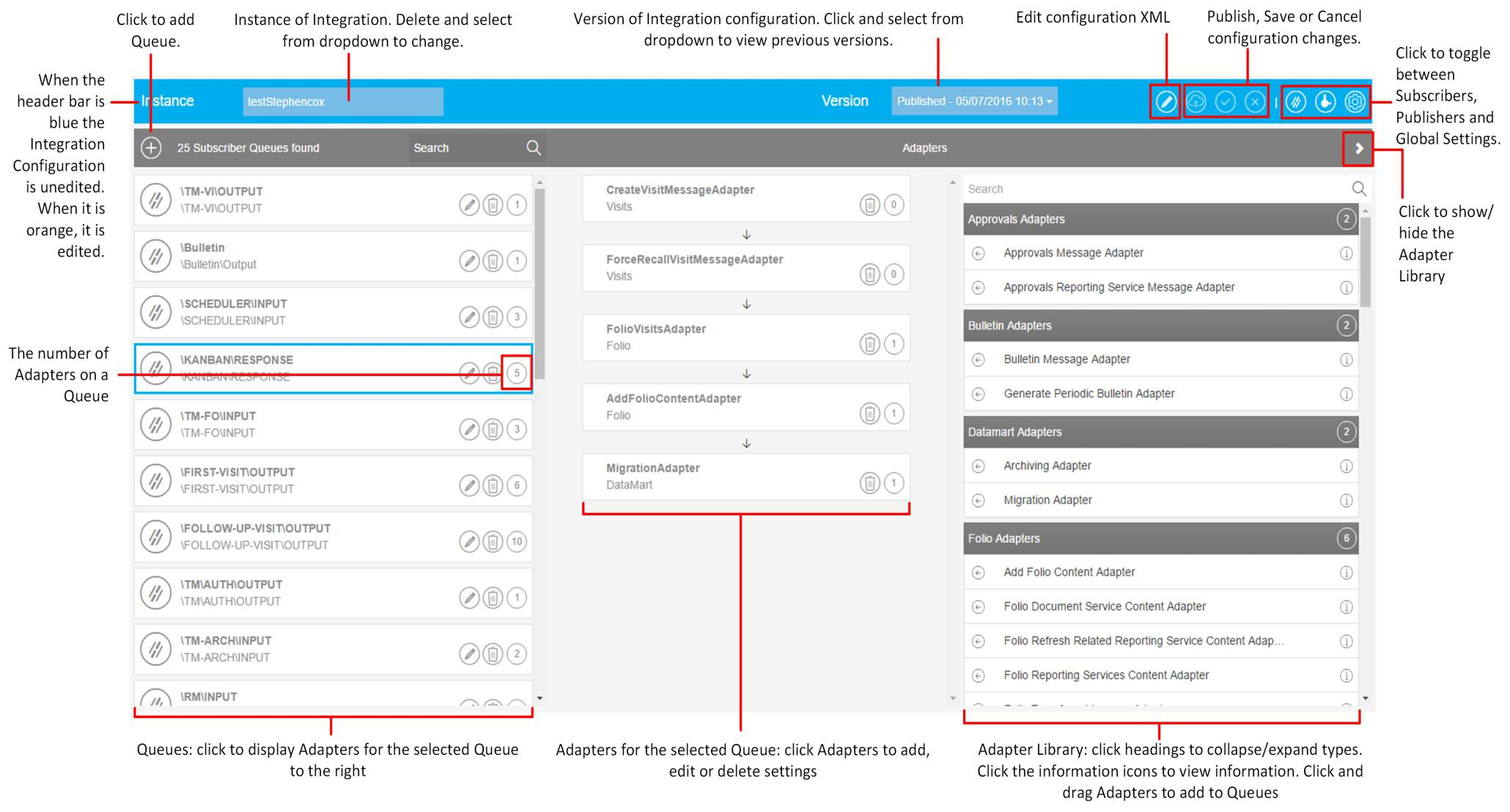
The Integration Instance Configuration page appears.
If an integration instance has a lock icon, then another WebAdmin user is editing the configuration. For more details refer to Override the Integration Lock.