Automatic Appointment Booking
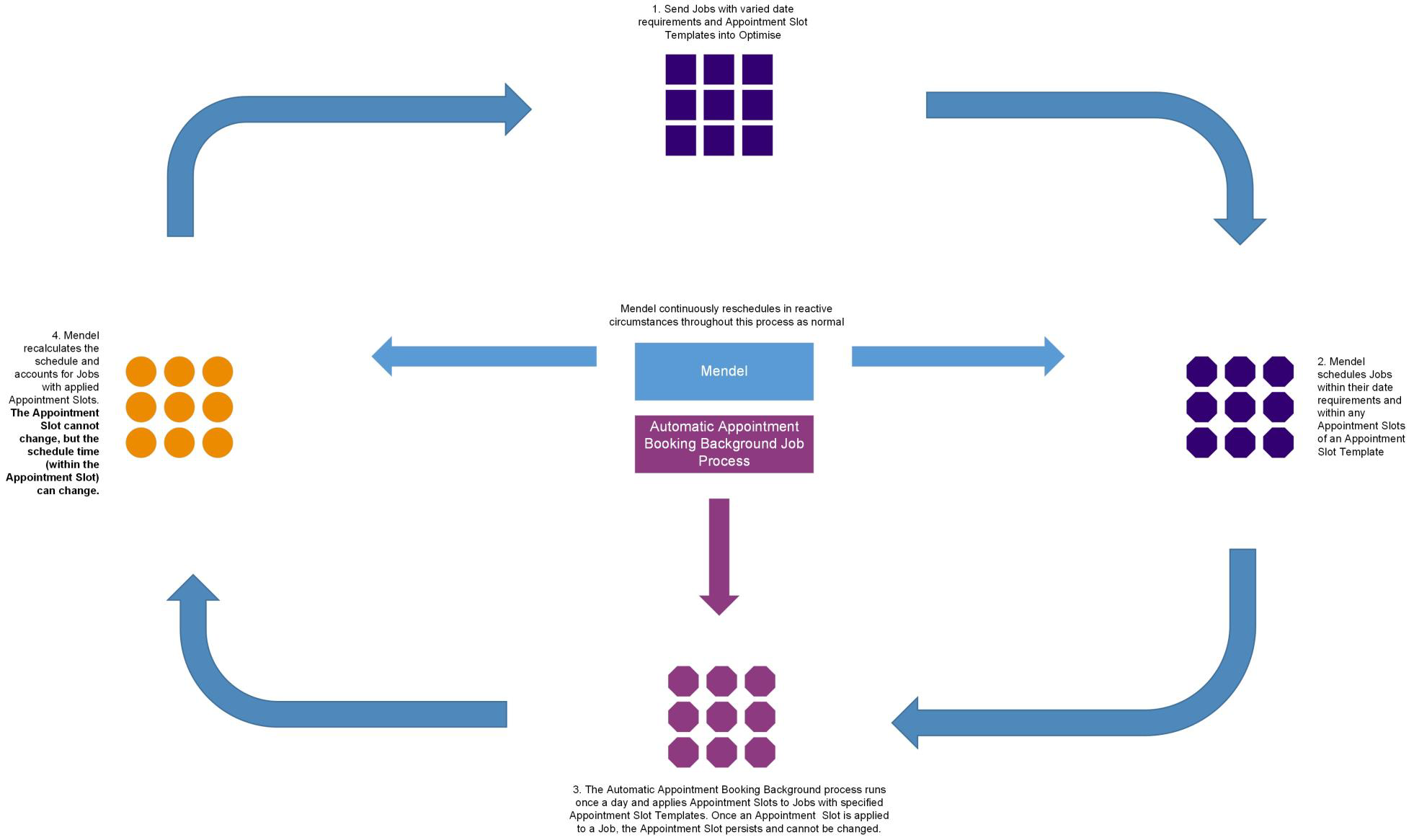
The automatic appointment booking background job is a process that automatically assigns specific appointment slots to jobs based on their location, required skills, and existing schedule. Instead of including a specific appointment date and time for every job you send into Optimise Schedule, jobs are sent with an appointment slot template. Mendel then places the job in the most efficient position in the plan, and the background job assigns a fixed appointment slot based on the overlap between the template and the scheduled window.
Automatic appointment booking is beneficial when you want to apply unchangeable appointment times to a batch of jobs (for example, for contractual reasons) on a regular basis without affecting separate non-appointed jobs, which Mendel dynamically reschedules in reactive circumstances.
For example, your department manages the cyclical maintenance of gas boilers. You need to appoint inspections for boilers two weeks in advance because you need to notify tenants via letter and email. Your department receives notification of around 50 gas boilers a day which require inspection appointments.
Your department also has a backlog of jobs which do not require appointments and which also have a lower priority than the boiler inspections. By running the automatic appointment booking background job on a nightly basis, Mendel can secure appointment slots for jobs which require commitments on a nightly basis so you can notify tenants, and also continually schedule jobs in the backlog which are more flexible.
See the image below for an overview of the automatic appointment booking process.
Prerequisites for Automatic Appointment Booking
-
You must have the following permissions:
-
Optimise Admin - Appointment Slot Templates
-
Optimise World(s) - Background Job Settings, Optimise Schedule, and Mendel Settings.
For more details refer to Permissions in the Administrator Guide.
-
-
Configure at least one appointment slot template. For more details refer to Create and Edit Appointment Slot Templates in the Administrator Guide.
-
Assign appointment slot templates to Worlds. For more details refer to Assign Appointment Slot Templates in the Administrator Guide.
-
Enable or edit the following Automatic Appointment Booking background job settings:
-
Background Process
-
Time
For more details refer to Background Job Settings in the Administrator Guide.
-
-
Enable the following Initialisation Strategies in Mendel:
-
Ordered by Target End
-
Rolling Initialisation
Also enable the Time Restriction Metric.
-
-
Specify Appointment Slot Templates in Optimise CreateJobRequest messages. Refer to the SampleXML folder in the Integration SDK. For more information contact Totalmobile.