Commit Jobs
You can commit jobs to override Mendel and schedule them at any time to a resource with the appropriate skills or attributes. You can also override job constraint types if required. For more details of constraint types, refer to Constraints in the Mendel User Guide.
When you commit a job, Mendel cannot reschedule it unless it is decommitted. For more details refer to Decommit Jobs.
Commit a Job
-
In WebAdmin select Optimise Schedule.
The Worlds page appears.
-
Select a World.
The Optimise Schedule page appears.
-
In the Job List, click and drag a job from the pile to a resource's Diary.

If enabled in the World, you can select multiple jobs from the Job List. Hold down the CTRL key, then select the individual jobs you want to commit. The jobs are highlighted and numbered in the order they were selected.
To select multiple jobs, enable the Multi-select option in Optimise Schedule Settings.A warning appears if you are committing a job that matches the contract and work type references in a customer Service Level Agreement and you are trying to assign the job inside the defined notification window.

-
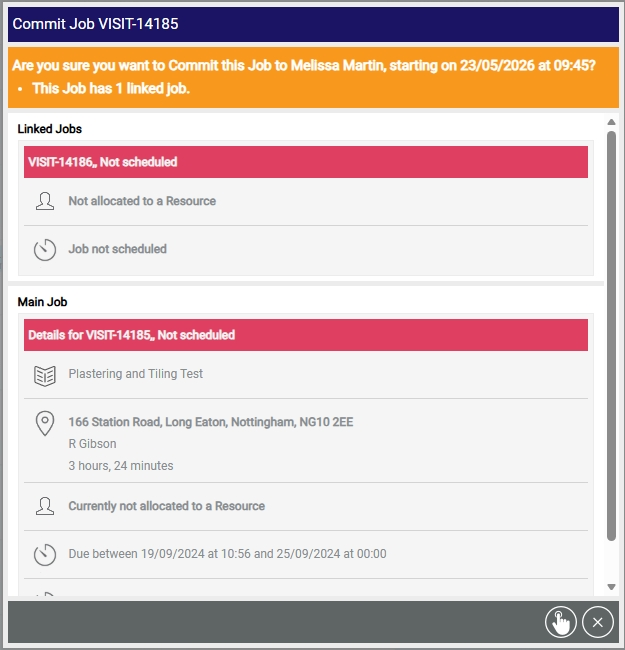
If the committed job requires further confirmation, a dialog appears. This dialog contains:
-
Scheduled time.
-
Current committed time (where applicable).
-
Any constraints requiring review.
-
Linked job information. If the job being scheduled has linked jobs, the dialog also displays:
-
Details of those linked jobs.
-
Their assigned resources (if applicable).
-
-
-
If required, review any constraints and select a reason code for overriding them.
-
Select Commit Job
 .
.