Diary
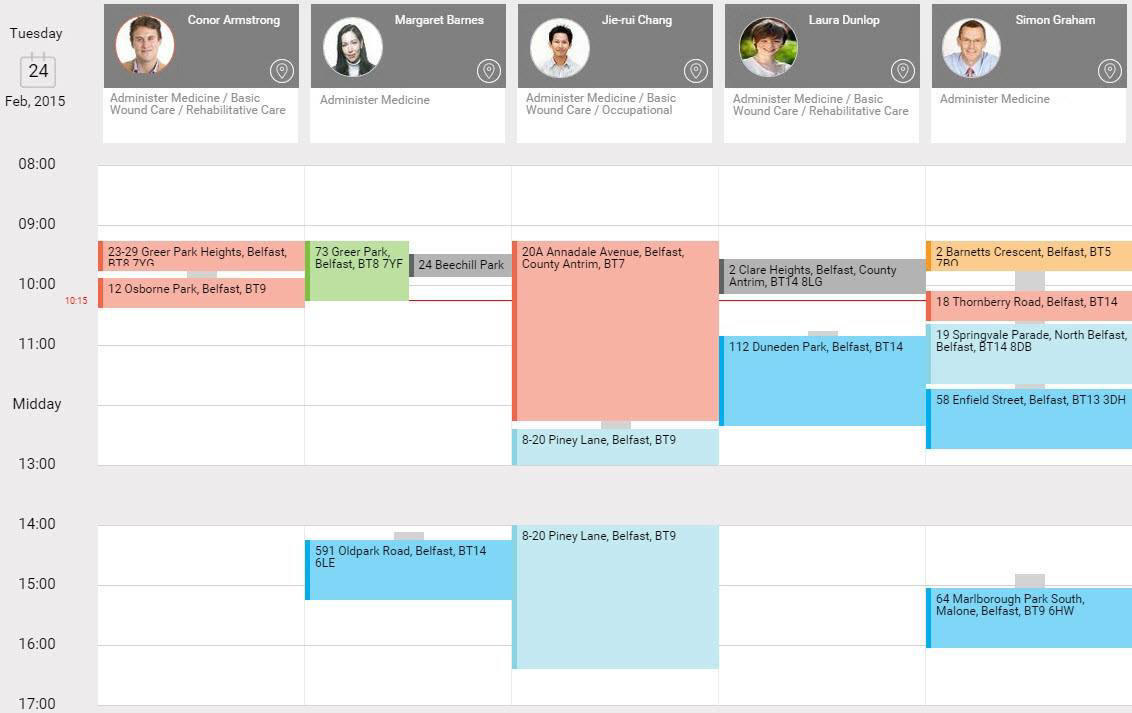
The Diary displays jobs. You can see what time jobs are scheduled to take place and which resources are scheduled to complete them. You can delete jobs from the Diary and also:
-
View job details
-
Recall jobs
-
Dispatch jobs
The equivalent to the started status must be set to Started within the Update Status Details Action field within Solution Workflows. The Overrun state is also dependent on this prerequisite.
The following colours categorise the different states of jobs in the diary:
-
 Not Started and before scheduled start time
 -
 Overdue - the scheduled start time has passed
 -
 At Risk - if the preceding job is over-running
 -
 Started and on schedule
 -
 Overrun - started but not completed before scheduled to be finished
 -
 Complete
These are the default colours. You can override the colours for specific visit statuses, work types and priority codes. For more details refer to Visit Statuses and Priorities in the Administrator Guide.
-
The grey bridges between jobs represent travel time.
-
The white blocks within the Diary represent availability, which you define in rosters. For more details refer to Rosters in the Administrator Guide.
-
The horizontal red line across the Diary represents the current time.